
- Features
- Resources
- Pricing
- Try Trainn's AI Video Agent


Product
Usecases
Resources
Case Studies
Company
- Customers
- Pricing
- Try Trainn's AI Video Agent
- Expert voices
- Log in
- Book a demo
- Sign up →
Published on: 10 Jun , 2026
How to Drive Product Adoption with Step-by-Step Guides
On this page
Most SaaS teams have step-by-step guides. Most of those guide programs are not moving adoption numbers.
The gap is almost always in delivery and measurement, not content. Guides that live in the wrong place, require too much interpretation to follow, and produce only aggregate view data will not drive adoption regardless of how good the writing is. Fix those three things, and the same guide library that was generating 500 help center views starts producing measurable feature adoption outcomes.
Step-by-step guides drive product adoption when three conditions are met: they are delivered inside the product at the moment of friction, they show the exact screen state at each action rather than describing it, and their impact is tracked at the customer account level.
Most guide programs miss on all three. Here's why each gap stalls adoption, and how to close it.
Why Most Guide Programs Don't Move the Adoption Needle
Three structural gaps explain why guide programs that look complete on paper do not produce measurable adoption outcomes.
Gap 1: Guides are delivered in the wrong place
A guide published in a help center requires customers to leave the product when they hit a friction point, search for the right guide, and return to complete the workflow. Most customers at a friction point do not do this. They file a ticket or abandon the feature entirely.
The guide that would have solved their problem existed. The delivery timing was wrong.
In-app delivery, where a guide surfaces inside the product on the screen where the friction occurs, removes that navigation gap. Customers get the instruction at the exact moment it is actionable, not hours later when a support agent responds.
Gap 2: Guides ask too much of the reader
A text-only step description like "navigate to Settings, then Integrations, then CRM, then click Connect" requires the customer to translate that instruction into the product interface in front of them. That translation is where confusion happens.
Annotated, screenshot-based guides that show the exact screen state after each action close that gap. When customers can match what they see in the guide to what they see in the product, the step from reading to doing becomes straightforward. The smaller that gap, the higher the completion rate for the workflow the guide covers. Before users reach in-product guidance, a short launch video can introduce what the product does and why it matters. For teams looking for a more produced launch asset, studios like Flowjam create story-driven launch videos for SaaS and AI startups.
Gap 3: Engagement is measured at the wrong level
Aggregate page views tell a CS team whether guides were opened. They do not tell the team whether specific customer accounts consumed the adoption-relevant content.
A guide can have 500 total views while the accounts with the lowest CRM feature adoption never opened it. Without per-account engagement data, there is no way to connect guide consumption to feature adoption by account, identify which customers are at risk, or prioritize proactive outreach before those accounts churn.
75% of new SaaS users abandon a product within the first week if onboarding falls short. (Userpilot, 2025)
How Step-by-Step Guides Drive Product Adoption
Step-by-step guides drive product adoption when three conditions are met:
- They are delivered inside the product at the moment of friction
- They show the exact product screen at each action rather than describing it
- Their impact is tracked at the customer account level.
Each condition directly addresses one of the three gaps above.
The mechanism is straightforward. A customer navigating a workflow hits a friction point. An in-app guide surfaces on that screen. The guide shows exactly what to do, screenshot by screenshot. The customer completes the workflow. That completion is tracked at the account level and connected to feature usage in the CRM. The adoption loop closes.
Where that mechanism works in the customer journey differs by stage:
| Stage | What the customer needs | Guide format that works |
|---|---|---|
| Onboarding | Learn the core workflow that makes the product valuable | Short, linear guides: 5 to 10 steps, one task, one outcome |
| Activation | Complete the action that unlocks the product's primary value | Guides with annotated screenshots showing the exact post-action screen state |
| Feature discovery | Find and understand capabilities beyond the core workflow | Searchable knowledge base and in-app guides surfaced on the relevant product screen |
| Advanced adoption | Master complex, multi-step workflows that drive long-term value | Structured sequences: linked guides that build from foundational to advanced, organised as a course |
81% of customers prefer to resolve product issues on their own before contacting support (Forrester Research, 2024). That preference exists. The question is whether the guide is available at the right moment to fulfil it.
How to Create Step-by-Step Guides in Trainn to Drive Adoption
Before you start recording, know which workflows you're building first. The highest-leverage starting point is the three to five workflows most commonly escalated to CSM calls and the activation step that first unlocks product value. Build those, get them in front of customers, and expand the library from there.
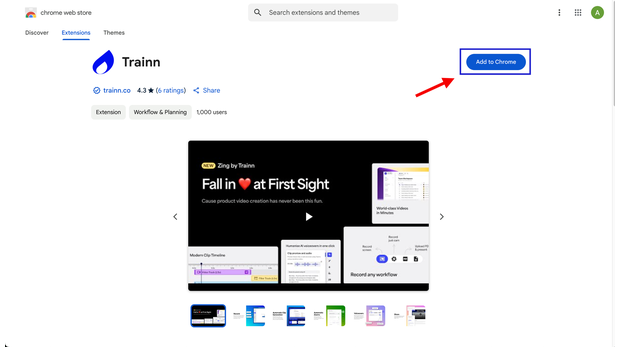
Step 1: Install the Trainn Chrome extension.
Go through this [link] and download the Trainn Chrome extension. The chrome extension is a must-have to record guides in Trainn.
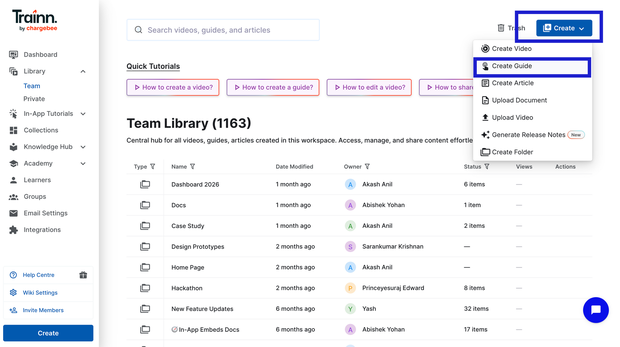
Step 2: Open Trainn and your product workflow
Go to the Library page. Click 'Create' and select 'Create Guide'.
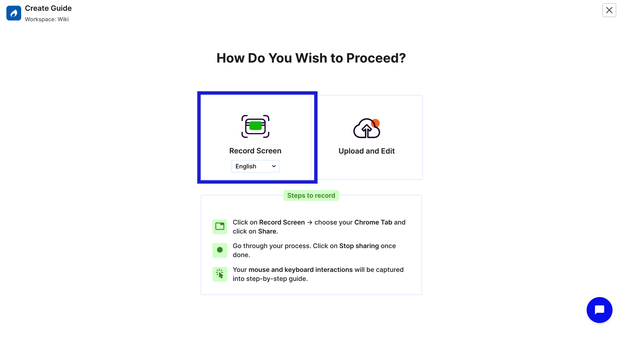
Step 3: Click Record and perform the workflow naturally
Click 'Record. Select the tab which you wanted to record and proceed with 'Share' to started recording. Just perform the workflow the way you would normally show it to a customer.
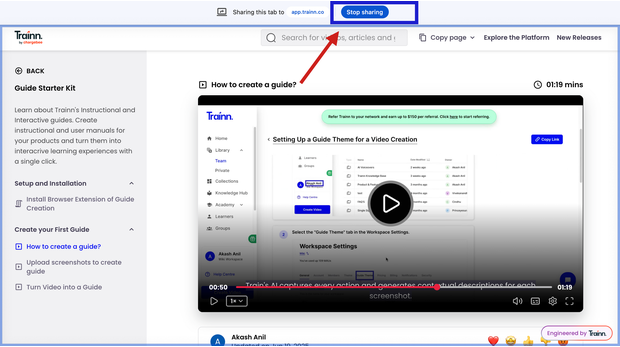
Step 4: Stop recording and step-by-step guide is generated
Once workflow is completed, click 'Stop sharing' from the same tab. Trainn automatically captures every action, and generates screenshots with zooms and spotlights to highlight actions and contextual step description.
Step 5: Review, edit and publish.
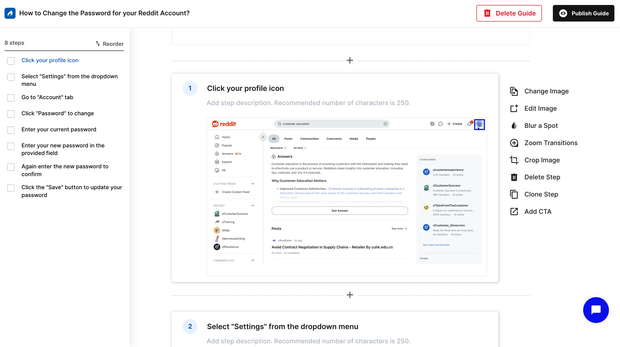
Review each step. Editing happens at the individual step level. Swap any screenshot that needs updating, adjust zooms or spotlights, edit description, blur any sensitive data, and reorder steps if needed. Once done, proceed to publish the guide.
Step 6: Enable the in-app tutorial builder
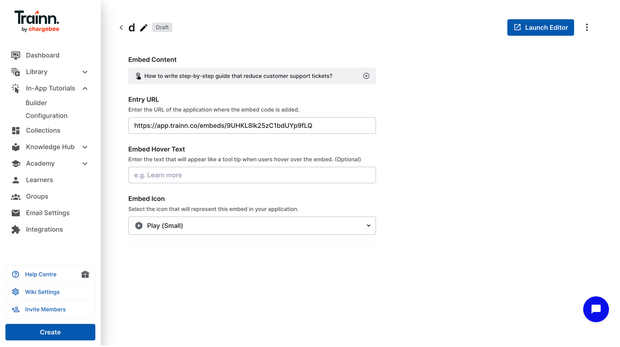
Go to In-app tutorials. Enter the application URL where you want to place the guide and also select the embed icon.
Step 7: Launch the in-app editor in your application
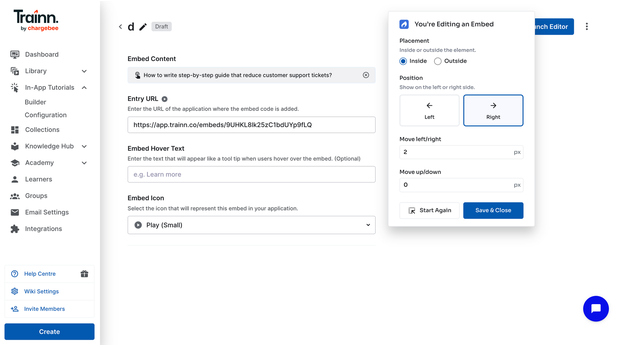
Click the launch editor and select the where you want to embed within the select page. Adjust the placement accordingly and proceed to Save and close. The guide is now surfaced inside the product, on the screen where customers need it, without a help center redirect.
Step 8: Publish the knowledge base inside your product
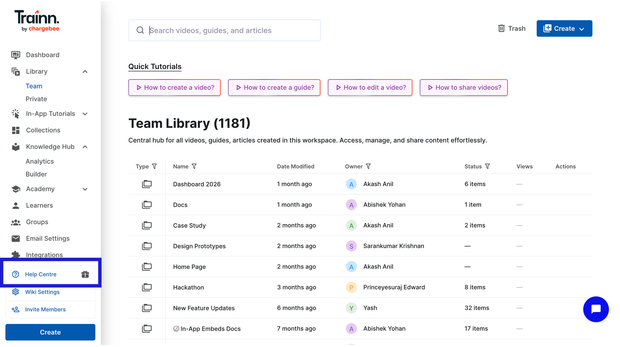
Enable the knowledge base widget within your product using Trainn's in-app widget. This gives customers a searchable, self-serve guide library accessible from inside the product at any point.
Frequently Asked Questions
How do step-by-step guides drive product adoption?
Step-by-step guides drive product adoption by delivering the exact instruction a customer needs at the moment they hit friction, in a format clear enough to act on without leaving the product. The mechanism works when guides are delivered in-app at the relevant screen, show annotated screenshots of the exact UI state at each step, and have their engagement tracked per customer account rather than as aggregate page views.
Why aren't my step-by-step guides driving feature adoption?
Three gaps typically explain the disconnect. Guides delivered in a help center are not found by customers at the moment they hit friction inside the product. Text-only descriptions without annotated screenshots require customers to translate instructions into the interface in front of them, which is where confusion and abandonment happen. And aggregate page view analytics do not show which specific customer accounts consumed adoption-relevant content, making it impossible to connect guide engagement to feature adoption by account.
How do you deliver step-by-step guides inside the product without engineering?
Use a guide creation tool with a built-in in-app delivery widget. Trainn's in-app tutorials widget embeds a searchable guide library inside your product with no code deployment required. You configure which guides appear on which product screens from the Trainn dashboard. Customers see the relevant guide in the widget on the screen where they need it, without navigating to an external help center.
How do you measure whether step-by-step guides are driving product adoption?
Track two layers. First, per-guide completion rate and per-step drop-off: this tells you whether customers are finishing guides and precisely where they stop. Second, per-account guide engagement: this tells you which customer accounts are using guides and which are not. Connect per-account engagement to feature usage data in your CRM. Accounts that complete guides on a feature and show high feature usage confirm the adoption mechanism is working. Accounts with low guide engagement and low feature adoption are your proactive outreach list.
What type of step-by-step guide works best for product adoption?
Guides that show the exact post-action screen state at each step, annotated with the specific element highlighted and an AI-written description that matches exactly what the customer sees, are significantly more effective than text-only descriptions. Short, task-focused guides covering one workflow and one outcome drive higher completion rates than comprehensive multi-workflow guides. For advanced feature adoption, guides organised as a structured course with a clear progression from foundational to advanced outperform standalone self-serve articles.
Next Steps
Guide programs fail at the delivery and measurement layer, not the content layer. Fixing where guides are delivered (in-app, at the moment of friction), how they are built (annotated, screenshot-based, action-triggered), and how their impact is tracked (per customer account, connected to CRM) converts a passive guide library into an active adoption motion.
For the infrastructure that makes guides deliverable and measurable at every customer touchpoint, see Trainn's in-app tutorials and knowledge base.
For more in this series: how to measure step-by-step guide performance and how to keep step-by-step guides consistent across a large team.
Start your free 14-day Trainn trial →
Ready to Trainn your customers?
- Create videos & guides
- Setup Knowledge Base
- Launch an Academy

Trainn is an AI-powered product video and guide creation platform that turns screen recordings into product demo videos, training videos, onboarding videos, step-by-step guides, and interactive walkthroughs. Trainn also delivers this content externally through a branded no-code LMS, or in-app through embedded tutorials to train customers at scale.

North Bethesda, Maryland 20852


