
- Features
- Resources
- Pricing
- Try Trainn's AI Video Agent


Product
Usecases
Resources
Case Studies
Company
- Customers
- Pricing
- Try Trainn's AI Video Agent
- Expert voices
- Log in
- Book a demo
- Sign up →
Published on: 09 Jun , 2026
How to Keep Step-by-Step Guides Consistent Across a Large Team
On this page
When one or two people create all the guides, consistency is almost automatic: the voice is the same because it comes from the same person, and the screenshots match because they were taken on the same machine. The moment the team grows to five creators, then eight, then ten across time zones, the library fragments. One guide uses red circles, another yellow arrows. One reads like a legal brief, the next like a Slack message. Customers feel this as a product-professionalism problem before they ever name it as a documentation problem.
Research shows 95% of organizations have brand guidelines, but only 30% use them consistently. Style guides don't fail because teams don't care. They fail because they rely on human memory and discipline. Both break down under deadline pressure.
Guide consistency at scale is a tooling architecture problem.
To keep step-by-step guides consistent across a large team, you have to standardize four things at the tooling level, not the policy level: one creation workflow with AI-written step descriptions, brand settings enforced by admins (not left to each creator), clip-based updates with assigned ownership, and a single delivery channel for every guide.
Why Step-by-Step Guide Libraries Become Inconsistent
Three structural failure modes cause guide libraries to drift. Identifying which one (or which combination) is driving the problem determines the fix.
Failure Mode 1: Fragmented Creation Tools
When different team members use different tools: some using a screenshot tool, some typing into a wiki, some recording screen captures. The output is structurally incompatible by definition.
Failure Mode 2: No Centralized Update Ownership
When the product changes, no system flags which guides are affected or assigns who updates them. One team member updates their guides; three others don't know the product changed.
Failure Mode 3: No Centralized Delivery
If guides reach customers through different channels: emailed PDFs, shared links, embedded wiki pages, customers get a fragmented experience regardless of how well-written the individual guides are. Consistency isn't only about how a guide looks. It's about where customers find it and what they can do with it.
67% of enterprise teams report documentation quality becomes inconsistent as the team grows past 10 contributors, primarily because tool fragmentation and distributed update ownership aren't addressed by policy alone. (Adobe Experience League, Brand Consistency at Scale, 2025)
What "Consistent" Actually Means for Step-by-Step Guides
| Dimension | What it means | How it breaks down at scale |
|---|---|---|
| Visual | Every guide looks like it came from the same brand: same annotation style, colors, fonts, screenshot framing | Creators use whichever annotation color they prefer; zoom and framing varies by person |
| Voice | Every guide sounds like one author: same tone, same level of detail, same terminology | One team member writes in corporate jargon; another writes like a Slack message; the same UI element has three names across the library |
| Information | Every guide reflects the current, accurate state of the product | No system flags which guides need updating when a feature changes. Outdated guides sit in the library unannounced |
A brand kit solves visual consistency but not voice or update drift. A style guide can address voice but not the operational problem of guides going stale with no owner tracking them. Teams that conflate the three dimensions often fix one while the other two continue to erode.
The Infrastructure That Enforces Consistency by Design
The teams that maintain consistent guide libraries aren't the teams with the best style guides. They're the teams with tooling architecture that makes inconsistency structurally difficult to produce.
Standardized creation workflow
One tool for every team member, with the same recording process and AI-generated step descriptions. When AI writes step text from screen action detection, individual writing variation is removed at the source. One creator writes formally; another writes casually. Both are moot when neither is writing the step descriptions. Every guide gets the same structural skeleton and voice regardless of who hit record.
Admin-level brand enforcement
Brand colors, fonts, and annotation styles configured once at the admin level and applied to every guide automatically. The key distinction: brand settings as creator options vs. brand settings enforced by default. Options invite deviation. Enforcement prevents it. When a creator cannot choose an off-brand annotation color because the system doesn't offer the choice, visual inconsistency becomes architecturally difficult, not just discouraged.
Clip-based update ownership
When the product changes, editors update the specific step's screenshot and description without re-recording the full guide. Team roles assign who owns which guide. Without clip-level editing, every product change becomes a full re-record, a workload teams consistently defer, which is how information inconsistency compounds release after release.
Organizations with documented update governance maintain 85% content accuracy vs. 52% in organizations without it. (Meister Task, Project Documentation Best Practices, 2025)
Centralized delivery
Every guide published to one knowledge base and surfaced through one in-app tutorials widget. Customers see a consistent branded experience: same navigation, same format, same search, regardless of which team member created the guide. Delivery consistency is the dimension most teams ignore until customers start complaining that the experience "feels off" without being able to say exactly why.
Getting Started with Trainn: Building a Consistent Guide Library
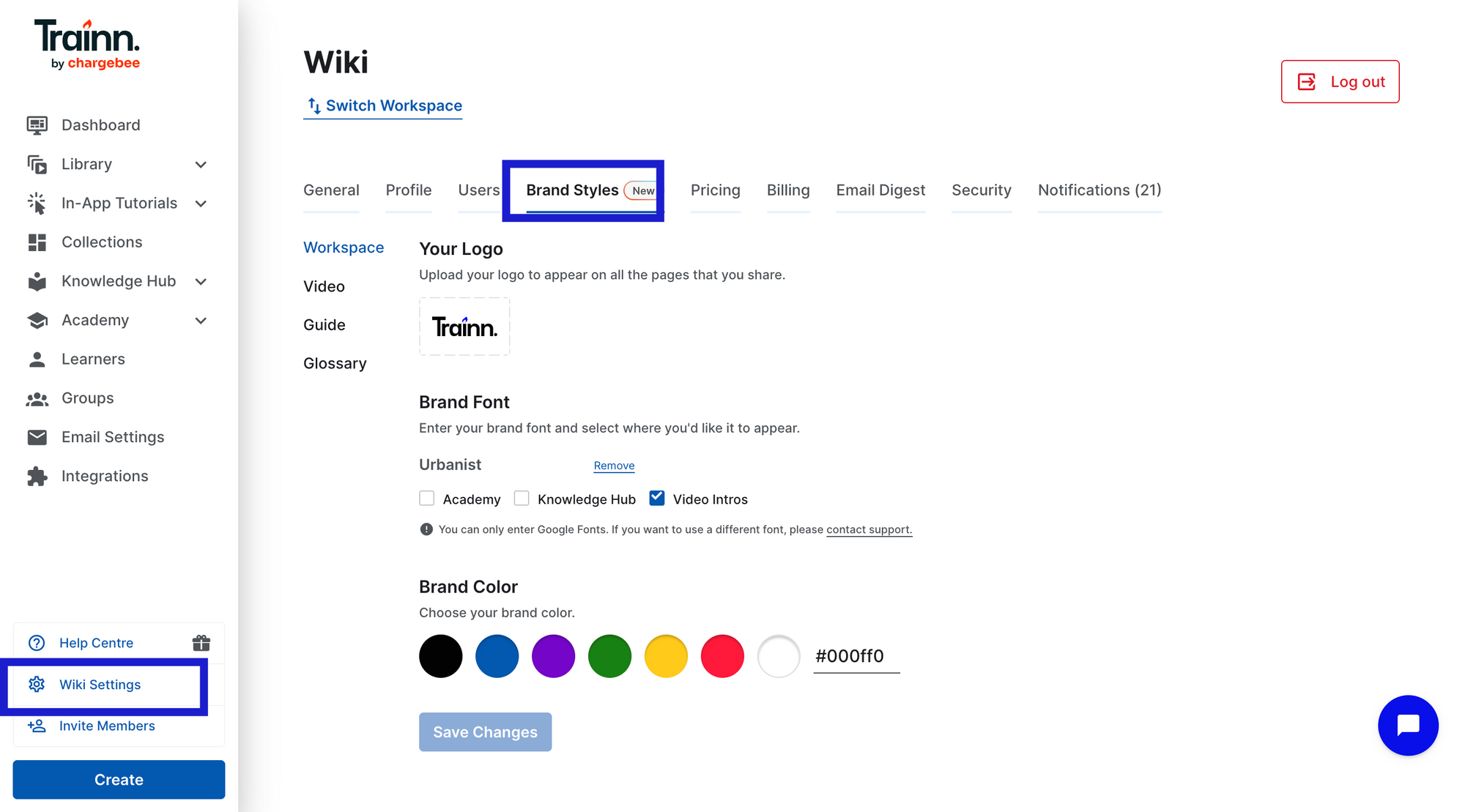
Step 1: Open Brand settings for your workspace
Go to your account settings and navigate to ‘Brand styles’ settings. This is where visual consistency across every guide in your library is configured once and enforced automatically from that point forward.
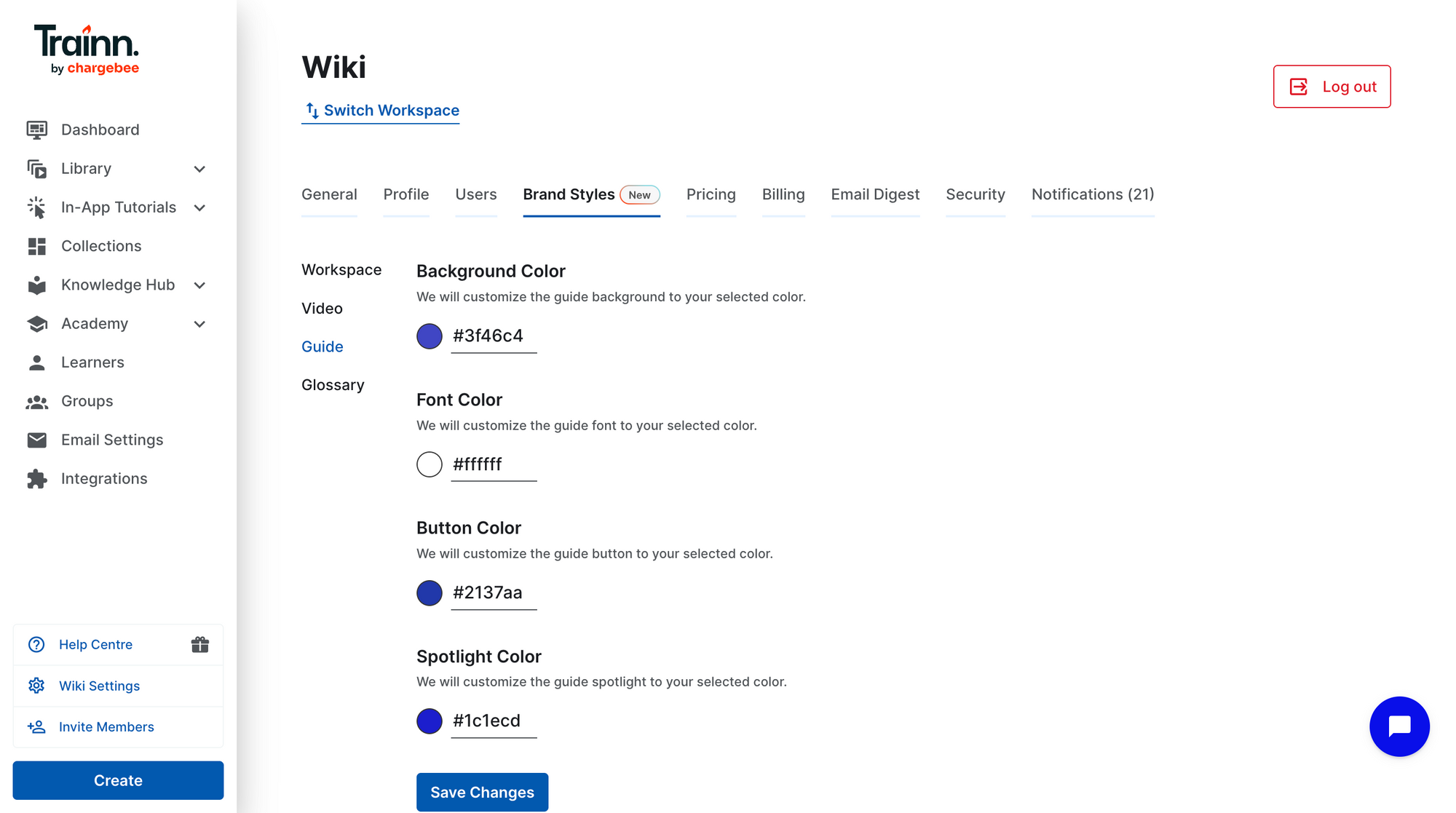
Step 2: Configure brand consistency for your guides
Go to the ‘Guide’ tab. Configure background color, font color, button color, spotlight colour and click ‘Save changes’ to apply. Every guide created by any team member from this point will inherit these settings. No creator choice, no deviation.
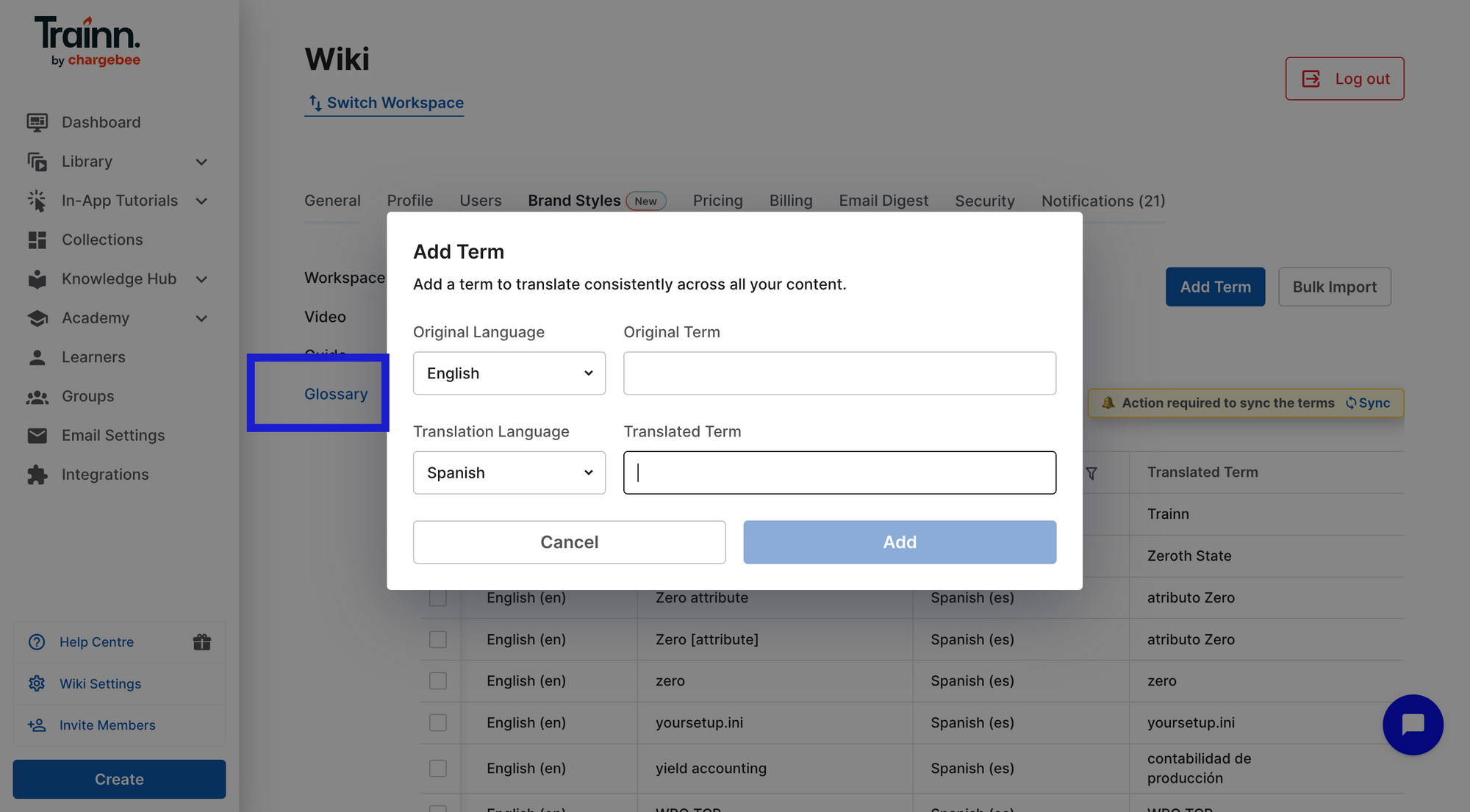
Step 3: Configure for consistent translated terms
Go to the Glossary tab. Add the original term in English and how its translated term to be. This ensures that when guides are translated across languages, the terminology stays consistent with what your team has standardized, not whatever a translation engine defaults to
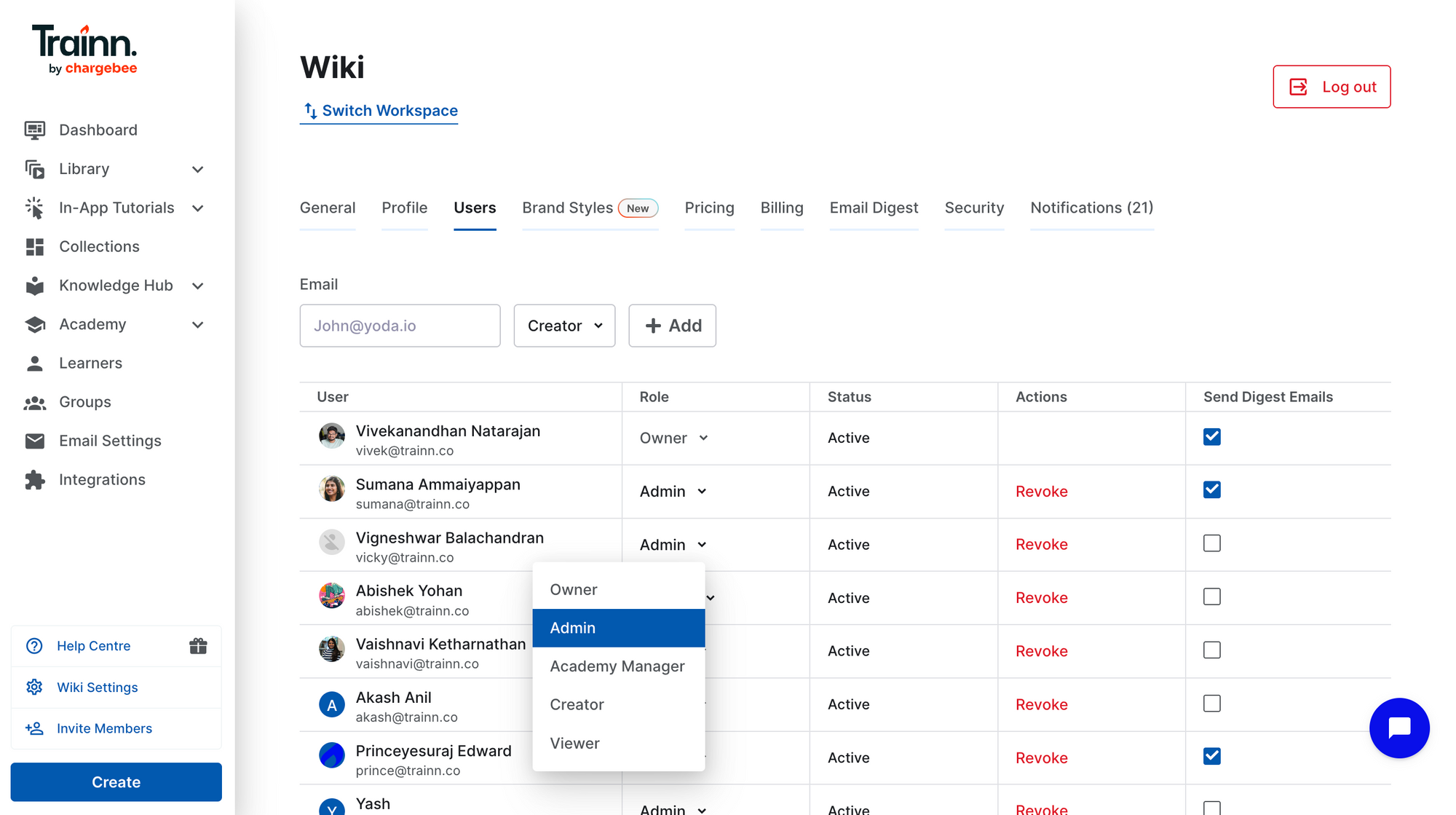
Step 4: Set team roles and permissions.
Assign admins, creator, and viewers roles. A documentation lead can hold a review gate before anything reaches customers. The permission structure creates an editorial workflow without a separate tool to manage it.
Step 5: Build and publish the guide library.
Record product workflows using the browser extension. Trainn AI generates step descriptions —same style, tone and level of detail — for every guide, automatically. Review, edit where needed, and publish to the centralized knowledge base and in-app tutorials . Every guide lives consistently across different channels from day one.
Step 6: Flag the guide updates to product releases.
When a feature changes, open the affected guide in Trainn, update the specific step's screenshot and description, and publish. Tie this to the product release cycle directly — documentation impact should be flagged in every release note, not discovered by customers after the fact. The clip-based model means 15 guides can be updated after a product release in minutes, not days.
Frequently Asked Questions
Why do step-by-step guides become inconsistent when a team grows?
Three structural failure modes drive it: fragmented creation tools (different software produces incompatible output by design), no centralized update ownership (product changes go undocumented when no system tracks which guides are affected), and no centralized delivery (guides sent through different channels produce a fragmented customer experience). Style guides don't address any of these — tooling infrastructure does.
How do you standardize step-by-step guide creation across a team?
Consolidate all guide creation into one tool with an AI-powered recording workflow. When AI generates step descriptions from screen action detection, individual writing variation is removed at the source — every guide gets the same voice regardless of who recorded it. Admin-level brand settings apply visual standards automatically, without requiring creators to remember to follow them.
How do you keep guides accurate when the product changes frequently?
Use a tool with clip-based editing — one that lets editors update a single step's screenshot and description without re-recording the full guide. Connect the update process to product releases: every release should flag which guides are affected, and those steps should be updated within a defined SLA. Without step-level editing, every product change becomes a full re-record. Teams defer those, and the library drifts.
What is the difference between visual and voice consistency in step-by-step guides? Visual consistency means every guide looks like it came from the same brand — same annotation colors, fonts, screenshot framing. Voice consistency means every guide sounds like it was written by the same author — same tone, same level of detail, same product terminology. Visual consistency is solved by admin-level brand enforcement. Voice consistency is most reliably solved by AI-generated step descriptions that remove individual writing variation before any editor sees the draft.
How do you audit a step-by-step guide library for consistency issues? Start with highest-traffic guides — a consistency problem seen by 500 customers monthly matters more than the same problem in a guide with 20 views. Check per-step drop-off data: a sharp drop at one step often signals an outdated screenshot or unclear instruction. Cross-reference last-update dates against product releases to find guides that have drifted. Spot-check five to ten guides for visual and voice consistency. Prioritize fixes by traffic volume and support ticket correlation.
Next Steps
Guide consistency at scale is an architecture problem, not a discipline problem. The three failure modes — fragmented creation tools, no centralized update ownership, no centralized delivery — each need an infrastructure fix. A style guide addresses none of them.
The teams that maintain consistent libraries have made inconsistency structurally difficult to produce: one creation workflow, AI-generated step descriptions, clip-based update ownership, and one delivery channel for every customer.
For the delivery infrastructure that makes guides findable and consistent across every customer touchpoint, see Trainn's knowledge base and in-app tutorials.
For more in this series: how to automatically create step-by-step guides from screen recordings and how to measure step-by-step guide performance.
Start your free 14-day Trainn trial →
Ready to Trainn your customers?
- Create videos & guides
- Setup Knowledge Base
- Launch an Academy

Trainn is an AI-powered product video and guide creation platform that turns screen recordings into product demo videos, training videos, onboarding videos, step-by-step guides, and interactive walkthroughs. Trainn also delivers this content externally through a branded no-code LMS, or in-app through embedded tutorials to train customers at scale.

North Bethesda, Maryland 20852


