
- Features
- Resources
- Pricing
- Try Trainn's AI Video Agent


Product
Usecases
Resources
Case Studies
Company
- Customers
- Pricing
- Try Trainn's AI Video Agent
- Expert voices
- Log in
- Book a demo
- Sign up →
Published on: 01 Jun , 2026
How to Translate Step-by-Step Guides into 25+ Languages
On this page
Most teams assume guide translation is a text problem — copy the step descriptions, run them through a translation tool, done. What they discover is a workflow problem. You have to copy the text out of the guide, translate it, reformat it back into the numbered step structure, and republish per language. Then the product ships an update and one step description changes. Now you do it again — for every language. At 25 languages and a biweekly release cadence, that is not a workflow. It is a full-time job. And 88% of support teams say they offer multilingual support, yet only 28% of customers actually see it in their native language (Intercom). The gap is not intention — it is workflow. This article covers why multilingual guides are a business requirement, why the translation workflow is harder than it looks, and how to translate your entire step-by-step guide library into 25+ languages — and keep every version current — using Trainn.
Why Multilingual Step-by-Step Guides Are a Business Requirement
The business case for multilingual guides is a retention and revenue argument, not an accessibility argument. Customers who cannot access help content in their native language do not stop needing help — they contact a support agent instead.
The numbers make the stakes concrete:
- 75% of consumers prefer to buy products in their native language (CSA Research)
- 60% of global consumers rarely or never buy from English-only websites (CSA Research)
- 68% of consumers prefer to receive customer service in their native language (CSA Research)
- 29% of businesses report losing customers because they don't offer multilingual support (Intercom)
An English-only guide library doesn't just leave non-English-speaking customers without help — it routes them toward human support agents for questions that a self-serve guide could resolve. Every undeflected ticket from a customer in Germany, Japan, or Brazil is a direct cost that a translated guide prevents. Multilingual guides are not a localisation project. They are a ticket deflection and retention strategy for every market where you have customers.
Most teams intend to provide multilingual support. The 28% who actually deliver it are the ones who solved the workflow problem — not the intention problem.
Why Translating Step-by-Step Guides Is Harder Than Translating a Document
Translating a step-by-step guide is not the same as translating a web page or a help article. Guides have structural characteristics that make generic translation tools insufficient at scale — and understanding these is what separates a workflow that holds from one that collapses within a quarter.
Guide text lives inside a structured format. Step descriptions are not free-form paragraphs. Each one belongs to a numbered step with a title, a screenshot, and an outcome. Translating the text in a generic tool and pasting it back into the correct steps, in the correct order, across 25 language versions, is a manual formatting task that multiplies with every guide and every language. The translation itself is rarely the slow part. The re-assembly is.
Guides update constantly. A SaaS product ships updates every two to four weeks. Every update is an opportunity for a step description to change — and for every translated version to become inaccurate. A guide library translated into 10 languages with no update-aware translation workflow accumulates translation debt with every product release. Within months, translated guides show outdated UI terminology and instructions that no longer match the current product.
Most guide creation tools have no translation capability. The most widely used guide creation tools in this category are English-only by design. Teams using these tools must export guide content, translate it in a separate tool, manually reformat it back into the guide structure, and republish — per guide, per language. For a 50-guide library into 10 languages, that is 500 separate manual translation and re-assembly operations before a single guide update occurs.
The translation itself is rarely the slow part. Getting the translated text back into the correct guide structure — per step, per language, per update cycle — is where manual workflows break down.
How to Translate Step-by-Step Guides into 25+ Languages: The Practical Path
To translate step-by-step guides into 25+ languages at scale, use a platform with native one-click translation — one that re-inserts the translated text back into the guide structure automatically and re-triggers translation when the base guide updates. A manual pipeline works for a single guide; it fails at 50 guides across 25 languages, especially when the product ships changes every two to four weeks.
| Approach | How it works | Right for |
|---|---|---|
| AI text translation tool (e.g. DeepL) | Copy text → translate → paste back into guide manually per language | 1–5 guides, one language, low update frequency |
| Translation management system (TMS) | Extract strings → route through translation workflow → re-insert → publish | Enterprise software teams with dedicated localization engineers |
| Platform-native one-click translation (Trainn) | Select target languages → Trainn AI translates step descriptions, titles, and metadata → all versions published automatically; re-triggers on guide update | Guide libraries of any size; teams without a translation agency or localization engineer |
The choice between these three approaches is not a translation quality decision. It is a workflow decision — and the right answer depends on how many guides you have, how many languages you need, and how often your product changes.
Manual vs. Platform-Native Translation: The Workflow and Maintenance Comparison
The difference between a manageable multilingual guide programme and one that collapses within a quarter comes down to whether translation is inside or outside the guide creation workflow.
| Step | Manual pipeline | Trainn |
|---|---|---|
| Translate step descriptions | Copy text → paste into translation tool → copy output → paste back into each step manually | Automatic — one click triggers translation of all step descriptions |
| Publish language versions | Create a separate guide entry per language; publish individually | All language versions published under the same guide automatically |
| Keep translated versions current | Re-translate affected steps → reformat → republish per language on every product update | Update the base guide → re-trigger translation for affected steps only |
| Time per guide (all languages) | 30–90 minutes per language | Under 5 minutes to trigger; processes automatically |
| Languages supported | Limited by manual workflow capacity | 30+ simultaneously |
The Maintenance Multiplication Problem
In a manual workflow, every product update multiplies by language count. A 10-minute English update becomes 10 minutes × 10 languages = 100 minutes of re-translation and republishing work per release cycle. At a biweekly release cadence with 50 active guides, this maintenance burden compounds rapidly. Teams that start a multilingual guide programme with manual tooling often abandon it within six months — not because the content wasn't valuable, but because the maintenance cost made it unsustainable.
In Trainn, re-triggering translation for the affected steps takes the same time regardless of how many languages the guide is published in. The update propagates automatically.
The Cost of Manual Translation at Scale
Professional translation costs $0.08–$0.40 per word (Alconost, 2026). A 50-guide library at 300 words per guide into 10 languages = 150,000 words = $12,000–$60,000 for a one-time translation. That is before any guide updates — and at a biweekly release cadence, re-translation costs accumulate continuously. There is no one-time cost in a living guide library. A Trainn platform subscription replaces per-word translation costs entirely, with updates included in the same workflow at no additional per-word cost.
Getting Started with Trainn: How to Translate Your Step-by-Step Guide Library
Translating a guide in Trainn takes five steps. No export, no external tool, no manual re-assembly — the translated guide is created directly from your original, with all step structure intact.
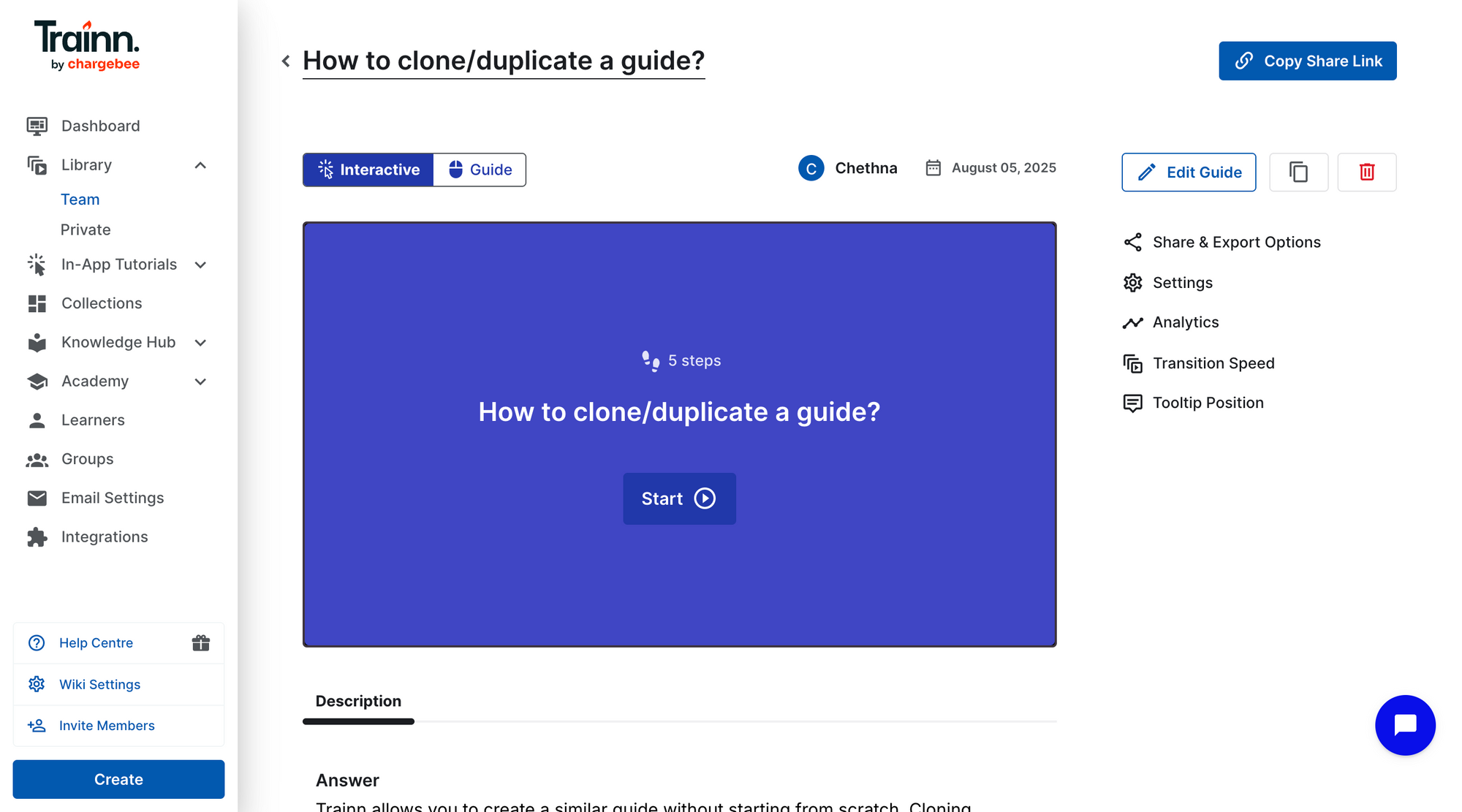
Step 1: Open the guide.
Go to your Library and open the original guide you want to translate. This is the base guide — make sure the step descriptions, titles, and screenshots are accurate before proceeding.
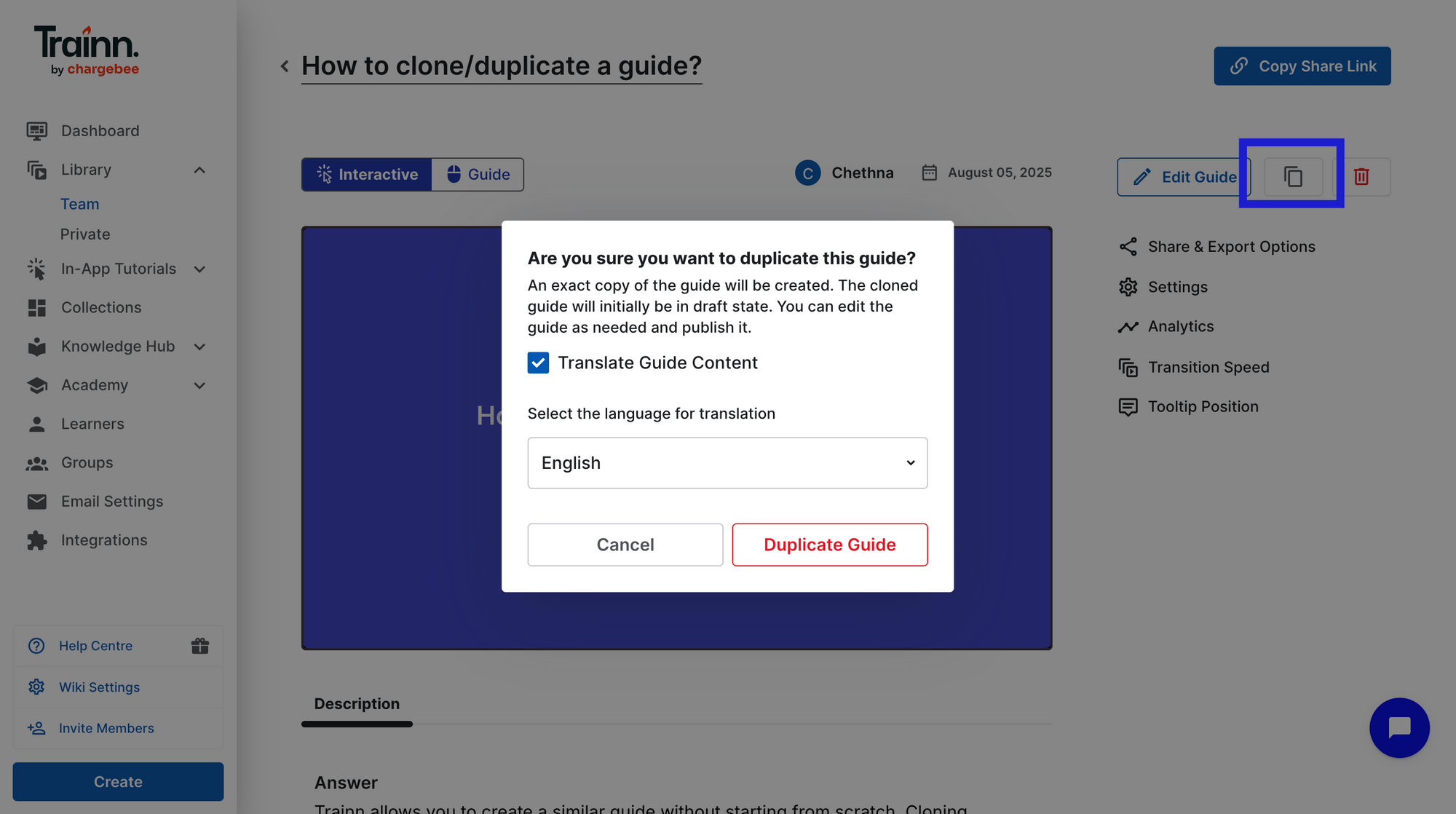
Step 2: Duplicate the guide and enable translation.
Click the Duplicate option. In the duplication dialog, check the Translate Guide Content box.
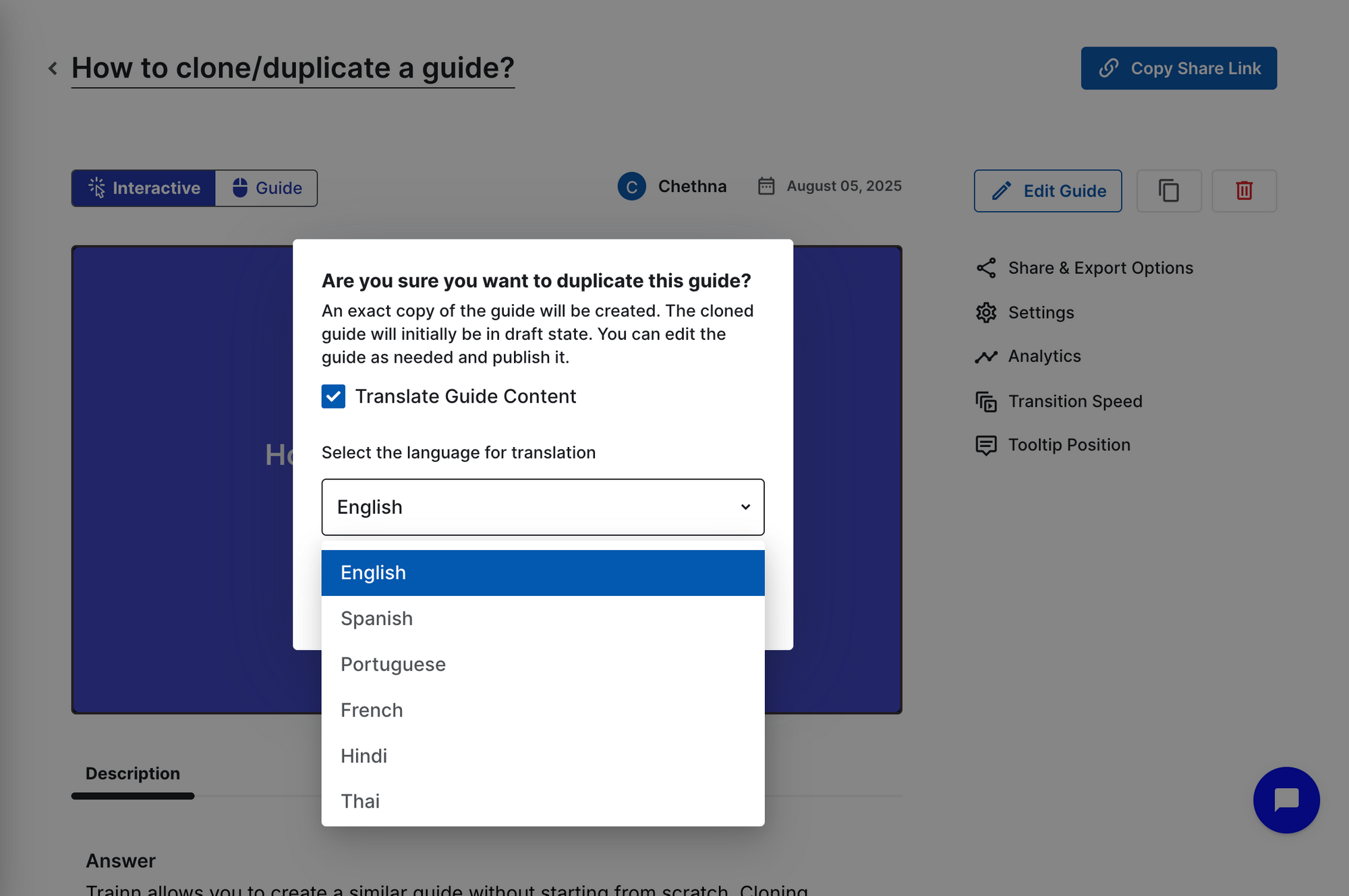
Step 3: Select your target languages.
Click the language dropdown. Trainn supports 30+ global languages — select all the languages you want to publish the guide in, then click Duplicate. Trainn AI translates the content into each selected language simultaneously.
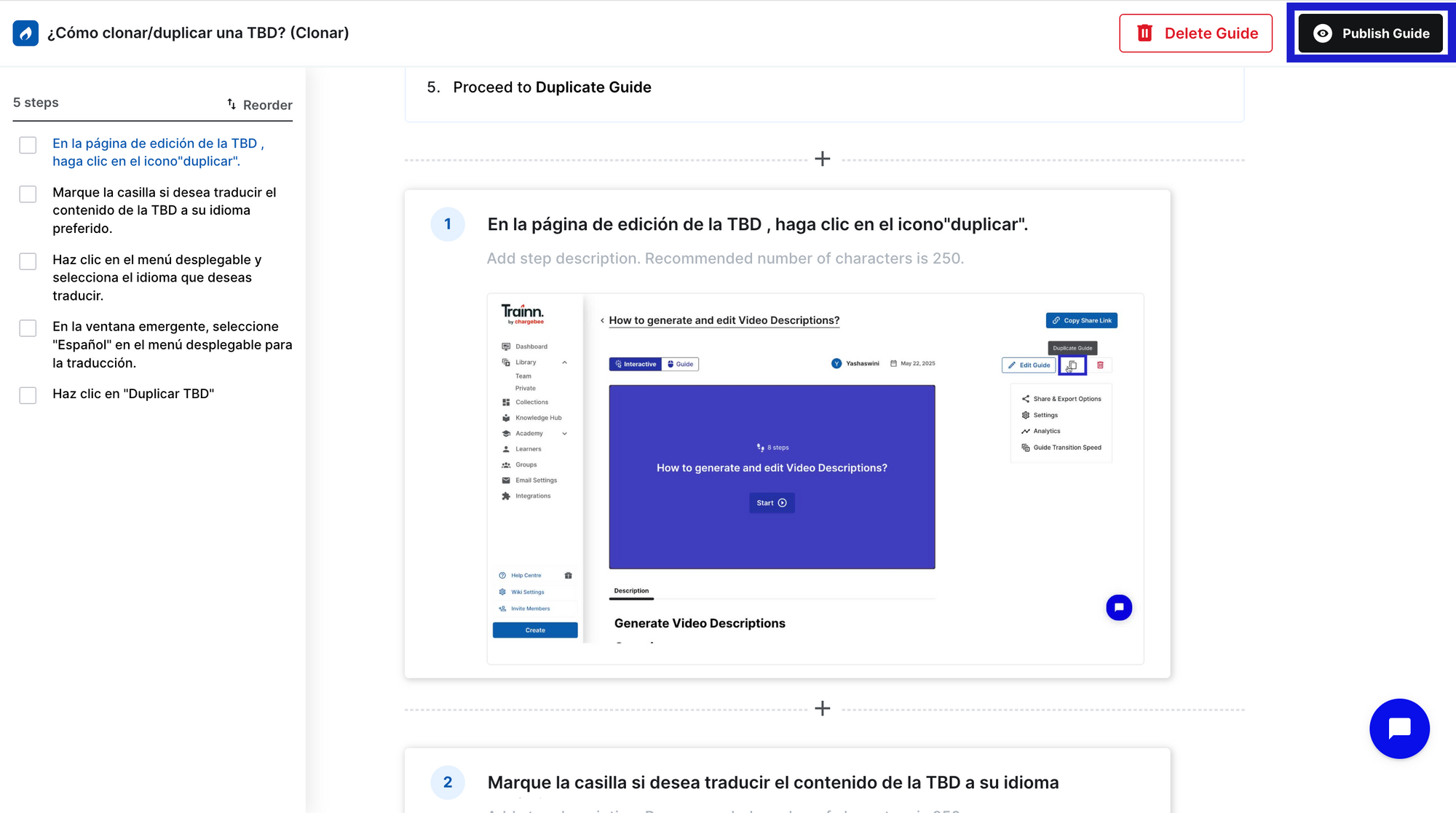
Step 4: Review the translated guide.
Open the translated guide and review the output. Pay particular attention to product-specific terminology, UI labels, and proper nouns — these may need manual correction to match how your product surfaces in each language.
Step 5: Publish the guide
When the review is complete, publish the guide. Deliver to in-built channel like Knowledge base, LMS, and in-app experience.
Frequently Asked Questions
How do I translate step-by-step guides into multiple languages at scale? Use a platform with native one-click guide translation that handles text re-insertion and republishing automatically — not a generic translation tool that requires manual copy-paste back into the guide structure. The scalability problem is not translation quality; it's the workflow of reassembling and maintaining 50+ guides across 25+ languages every time the product changes.
What happens to translated guides when the base guide is updated? In a manual translation workflow, every guide update requires re-translating affected steps and republishing per language — effort that multiplies by language count. In Trainn, you update the affected steps in the base guide and re-trigger translation for those steps only. The update propagates to all language versions automatically, with no per-language re-work.
How do I decide which languages to translate my guides into first? Start with the languages where customer concentration is highest, support ticket volume from non-English speakers is greatest, or you have active regional CS teams who can review output quality. A staged approach — two to four priority languages first, then expanding — lets you validate translation quality and build a review process before scaling to 25+ languages.
How much does it cost to translate a step-by-step guide library into multiple languages? Manual translation of a 50-guide library (300 words per guide average) into 10 languages costs $12,000–$60,000 at professional translation rates ($0.08–$0.40/word) — before any guide update re-translations. Platform-native translation (Trainn's Scale plan) replaces per-word translation cost with a platform subscription, with all update re-translations included in the same workflow at no additional per-word cost.
Can I translate only some guides rather than the full library? Yes — guide-by-guide translation lets teams prioritise high-traffic guides, onboarding workflows, or content for a specific market launch without translating the entire library at once. Starting with the top 10–15 guides by view count or by the highest post-view ticket rate gives multilingual coverage where it has the most immediate impact on self-service resolution and ticket deflection.
Next Steps
Translating step-by-step guides is a workflow problem, not a translation quality problem. The teams who successfully deliver multilingual guides at scale are the ones who removed the manual re-assembly and maintenance steps from the process — not the ones who hired more translators or built more complex external pipelines.
Before translating, audit your base guides and decide which languages you need. Then in a tool like Trainn, it's one click per guide. After that, every time you update the English version in Trainn, all language versions update automatically.
For more context on keeping your guide library current as the product changes, see how often to update step-by-step guides. For the delivery infrastructure that serves translated guides across every customer touchpoint, see Trainn's knowledge base and in-app tutorials.
Ready to Trainn your customers?
- Create videos & guides
- Setup Knowledge Base
- Launch an Academy

Trainn is an AI-powered product video and guide creation platform that turns screen recordings into product demo videos, training videos, onboarding videos, step-by-step guides, and interactive walkthroughs. Trainn also delivers this content externally through a branded no-code LMS, or in-app through embedded tutorials to train customers at scale.

North Bethesda, Maryland 20852


