
- Features
- Resources
- Pricing
- Try Trainn's AI Video Agent


Product
Usecases
Resources
Case Studies
Company
- Customers
- Pricing
- Try Trainn's AI Video Agent
- Expert voices
- Log in
- Book a demo
- Sign up →
Published on: 26 May , 2026
How to Write Step-by-Step Guides That Reduce Customer Support Tickets
On this page
Most step-by-step guides don't reduce support tickets. Not because they're missing — but because the customer opens the guide, hits a step that isn't clear enough to act on, and files a ticket anyway. 81% of customers try to resolve issues on their own before contacting support (Zendesk CX Trends Report). Every one of those attempts is a chance for a guide to intercept a ticket. When the guide fails, the cost is real: self-service costs $0.10 per contact versus $8.01 for a live agent interaction (Gartner). And the bar for success is real: across 61,000+ learner sessions on Trainn, 69% of customers who start a guide complete it end-to-end — meaning 31% don't, and many of those become tickets. This article covers exactly what separates a step-by-step guide that deflects tickets from one that doesn't — from topic selection and step-level writing to scaling creation and measuring deflection.
What Makes a Step-by-Step Guide Reduce Support Tickets
A step-by-step guide reduces support tickets when five things are true: it covers a topic customers are actively confused about, describes each action clearly enough to act on without pausing, uses annotated screenshots that match the current product UI, confirms what the customer should see after each step, and is delivered where the customer is stuck — not at a URL they have to navigate to separately.
To write a step-by-step guide that reduces support tickets:
- Choose the topic from your support ticket queue — not your feature list
- Write the title in customer language, phrased as a question
- Write each step with one action, a clear description, an annotated screenshot, and an outcome confirmation
- Keep each guide to one task — eight to eleven steps
- Measure completion rate and per-step drop-off to find exactly which step is causing customers to stop
Miss any one of these, and the guide may get opened — but it won't reduce the ticket.
How to Write a Step-by-Step Guide that Reduces Support Tickets
Step 1: Choose Topics From Your Support Ticket Queue, Not Your Feature List
Start with your ten most-filed support ticket topics from the past 90 days. These become your first ten step-by-step guides.
A guide written from ticket data answers a question customers are already asking. A guide written from your product's feature list documents what your product team built — not what confused customers are searching for. These are rarely the same list.
Once you have your initial topics, map each to the customer journey stage — onboarding confusion, core workflow errors, feature adoption gaps, troubleshooting, and admin setup. This ensures your first guides cover the highest-volume confusion points across the full lifecycle, not just the topics your team finds easiest to document.
When a support ticket appears three times on the same topic, that topic needs a step-by-step guide. Make it a rule.
Step 2: Write Guide Titles the Way Customers Search
The title of a step-by-step guide is the search query. If the title uses product language, customers skip it — in your help center and in AI-generated search responses.
Customers who are confused type what they're confused about: "How do I add someone?" not "User Administration." When guide titles match customer language, they surface in help center search, in Google, and in AI Overviews. When they don't, even an accurate, well-written guide goes unfound.
| Don't Use (Product Language) | Use Instead (Customer Language) |
|---|---|
| User Administration | How do I add a new team member? |
| Data Management | How do I export my data? |
| Notification Settings | How do I turn off email alerts? |
| Workspace Configuration | How do I change my account name? |
| Integration Overview | How do I connect my CRM? |
What ~6300 guide titles on Trainn tell us about title framing
Even within Trainn's own user base, customer-question framing is the minority pattern:
- Only 15% of guide titles lead with "How" — the framing customers actually use when they search.
- 46% lead with a gerund like "Creating a New Campaign" or "Managing User Access" — descriptive of the action, but written in product language.
- 34% are noun-led ("User Administration," "Risk Analysis Guide") — the pattern the table above flags as the one to avoid.
- The median guide title is 7 words long — short enough to scan in a help-center list.
The shift from gerund or noun framing to customer-question framing is one of the highest-leverage edits a documentation team can make. Most guides already exist. Rewriting the title costs minutes and meaningfully changes whether the right customer finds them.
This framing matters beyond your help center. ChatGPT, Google AI Overviews, and Perplexity pull from pages that are phrased as direct answers to natural-language questions. A guide titled as a customer question is far more likely to appear in AI-generated responses than one titled as a feature name.
Step 3: Write Each Step So the Customer Can Act Without Pausing
Most guides that fail to deflect tickets don't fail across the whole guide — they fail at one specific step. One unclear step at step three of a seven-step guide produces a ticket.
The customer pauses, loses confidence, and closes the tab. That pause becomes a support ticket. The fix is not to rewrite the whole guide — it is to make every step complete enough that the customer never needs to pause.
Every step in a ticket-deflecting step-by-step guide needs four things:
| Step Element | What It Does | Common Mistake |
|---|---|---|
| Step title | Names the action in task-oriented language — what to do, not what happened | Writing what the system does, not what the customer does ("Page loads" instead of "Click Settings") |
| Step description | Explains exactly what to click, type, or select — and why, if it isn't obvious | Too vague ("click the button") or too long (a paragraph of context before the action) |
| Annotated screenshot | Shows exactly which UI element the step refers to — with a zoom or highlight on the relevant area | No annotation, or a screenshot from an outdated version of the product |
| Outcome confirmation | Tells the customer what they should see after completing the step with a CTA or end card | Left out entirely — the customer completes the action and doesn't know if it worked |
When any one of these four elements is missing, customers pause. A pause at step three of a seven-step guide usually produces a ticket, not a completion.
One action per step. If a step description contains the words "and then," it covers two actions. Split it. A step that asks the customer to click, then type, then select is three steps written as one.
What 116,000+ step descriptions on Trainn tell us about clear step writing
We analyzed step descriptions from the ~6,300 guides published on Trainn to see what the data tells us:
- Action verbs lead 46% of all step descriptions. The top three: Click (23%), Select (8%), and Enter (5%). The pattern is consistent — high-performing step descriptions start with what the customer should do, not what the system does.
- The typical step description runs 11 words (median) — short enough to scan, long enough to specify the action and its target ("Click on the 'Settings' gear icon in the top right corner"). Most step descriptions (67%) fall between 7 and 15 words.
- The discipline of one-action-per-step is widely followed in practice: fewer than 1% of step descriptions contain the phrase "and then." Experienced creators split multi-action moments into separate steps by default.
Step 4: Keep Each Guide to One Task
Guides that cover more than one task have lower completion rates. If a guide runs beyond fifteen steps, it almost always covers more than one task.
Break the guide at the natural completion point — the moment a customer would pause and feel a sense of progress. Then link directly to the next guide. Nielsen Norman Group's research on procedural usability is consistent: users completing a task want to know when they've finished a phase. A 22-step guide reads as one enormous task. Four five-step guides, each answering one question, read as four completable tasks.
If the step count exceeds ten, or a step clearly starts a different workflow, or drop-off spikes at a mid-guide point — those are signals the guide covers more than one task. Split it at that point, end with a clear completion message, and link directly to the next guide.
Linking guides together is more effective than combining them. A customer who finishes guide one and clicks through to guide two has completed a task. A customer who abandons a 15-step guide at step nine has not.
Step 5: Create Step-by-Step Guides at Scale Without Writing Everything Manually
Writing each step-by-step guide by hand — typing every description, capturing every screenshot, drawing every annotation — takes 45 to 60 minutes per guide.
At that pace, 50 guides takes a full week of dedicated work. Most CS or support teams don't have that week. The knowledge base stays half-built, the guides that do exist go stale, and the tickets keep coming in.
The way out is a creation workflow that removes writing and screenshotting from the process entirely.
With Trainn's step-by-step guides feature, you record the product workflow once. Trainn handles the rest:
- Detects every click, input, and navigation action as a separate step
- Writes an AI-generated contextual title and description for each step — no writing required
- Adds zoom effects and spotlight highlights to the relevant UI element in each screenshot
- Outputs a finished, publishable step-by-step guide with annotated screenshots, ready to share
A guide that takes 45–60 minutes to write manually takes under 10 minutes with Trainn. That difference is what makes it possible to build a library of 50 step-by-step guides in weeks rather than months.
When a step needs adjusting — the description needs more detail, or a screenshot needs retaking — you edit that step inline without re-recording the full workflow.
“Whatever customers need, we've got a way to support them now. If they like reading through documents, there’s the help guides we have built using Trainn.”
Gareth Morris
General Manager, Groundplan
Step 6: Keep Step-by-Step Guides Accurate After Every Product Release
A step-by-step guide becomes a ticket generator the moment its screenshot no longer matches the customer's screen.
SaaS products ship updates every two to four weeks. Every UI rename, button move, or workflow change creates an accuracy gap in every guide that covers that area. 72% of customers prefer self-service over contacting support (Forrester Research). When those customers open a guide and the screenshot at step two doesn't match their screen, they don't try a different guide — they lose trust in the documentation and file a ticket.
Build a maintenance trigger into your release process. Assign an owner to each section of your guide library. Every product release that changes a UI element, renames a feature, or modifies a workflow should flag the affected guides for review — completed before the release ships, not discovered by a customer after.
When reviewing a guide after a product change, cover all five update points:
| What to Review | What to Update |
|---|---|
| Screenshots at each step | Replace any showing outdated UI elements or old navigation |
| Step descriptions | Revise references to renamed menus, buttons, or fields |
| Step count | Add steps if the workflow gained required actions; remove if it was simplified |
| Outcome confirmations | Update if the confirmation screen, message, or state changed |
| Related guide links | Verify linked guides are still accurate and lead to the right next task |
With Trainn, updating a step-by-step guide means editing the affected step inline — swap the screenshot, revise the description — and publishing. The update propagates instantly across every channel where the guide is live: the knowledge base, in-app tutorials widget, and any course it is part of. No re-recording. No re-publishing separately to each surface.
"When a new feature is out, we just update a couple of slides on the video, push the video live in 10 minutes, and customers can benefit right away. Educating 12,000 customers in real-time felt easy." — Shambhavi Pandey, General Manager, Restroworks
Step 7: Measure Which Guides Are Deflecting Tickets and Which Aren't
Page views tell you a guide was opened. Completion rate tells you whether it helped. Per-step drop-off tells you exactly which step caused the customer to stop.
Measuring total knowledge base traffic tells you nothing actionable. Measuring at the individual guide level — and at the individual step level — tells you exactly where to spend the next hour of editing time.
| Metric | What It Measures | What Low Performance Signals |
|---|---|---|
| Guide view count | Is the guide discoverable? | Guide not surfaced in search or your help centert; title doesn't match search intent |
| Guide completion rate | Is the guide clear enough to follow to the end? | A specific step is confusing, outdated, or too vague |
| Per-step drop-off | Which step causes customers to abandon? | That step needs a better description or a retaken screenshot |
| Follow-up ticket rate | Did the guide actually resolve the problem? | Guide answers the wrong question, or stops one step too early |
| In-app vs. help center access | Where are customers finding guides? | Most access is external — in-app delivery needs improvement |
What "good" looks like, based on 6,300+ guides and 61,000+ learner sessions on Trainn
Most teams measuring guide performance for the first time don't know what a healthy completion rate looks like. Trainn's own data offers a baseline: across 61,000+ learner sessions, 69% of customers who start a guide complete it end-to-end, and 82% get at least halfway through.
Use those as soft benchmarks, not hard targets. A guide landing at 50% completion isn't broken — but it's worth opening to see where the drop-off is. A guide landing at 20% likely has a specific step that's confusing the customer enough to send them to support instead.
Two patterns to act on immediately. A guide with high views and low completion is findable but not followable — fix the step where drop-off spikes. A guide with high completion but persistent follow-up tickets is answering the wrong question — check whether the topic in the guide matches the actual ticket topic.
Trainn's analytics dashboard surfaces all five metrics per step-by-step guide, across every delivery channel. Support leads can see which guides are actively deflecting tickets and which need to be updated — without waiting for a quarterly review to surface the gap.
The Business Case: What One Good Step-by-Step Guide Is Worth
| Metric | Source | Figure |
|---|---|---|
| Customers who try self-service before contacting support | Zendesk CX Trends Report | 81% |
| Customers who prefer finding answers independently | Forrester Research | 72% |
| Cost per self-service contact | Gartner | $0.10 |
| Cost per live agent contact | Gartner | $8.01 |
| Cost gap between self-service and live support | Gartner | 80x |
For a CS team handling 3,000 tickets per month, deflecting 40% of them through step-by-step guides saves between $18,000 and $24,000 per month at standard ticket handling costs. The investment in writing guides well is a rounding error compared to the cost of writing them badly.
How Trainn Helps You Write Step-by-Step Guides That Reduce Tickets
Trainn is built around a single idea: record a workflow once, and get a step-by-step guide ready to publish. Here is exactly how to go about:
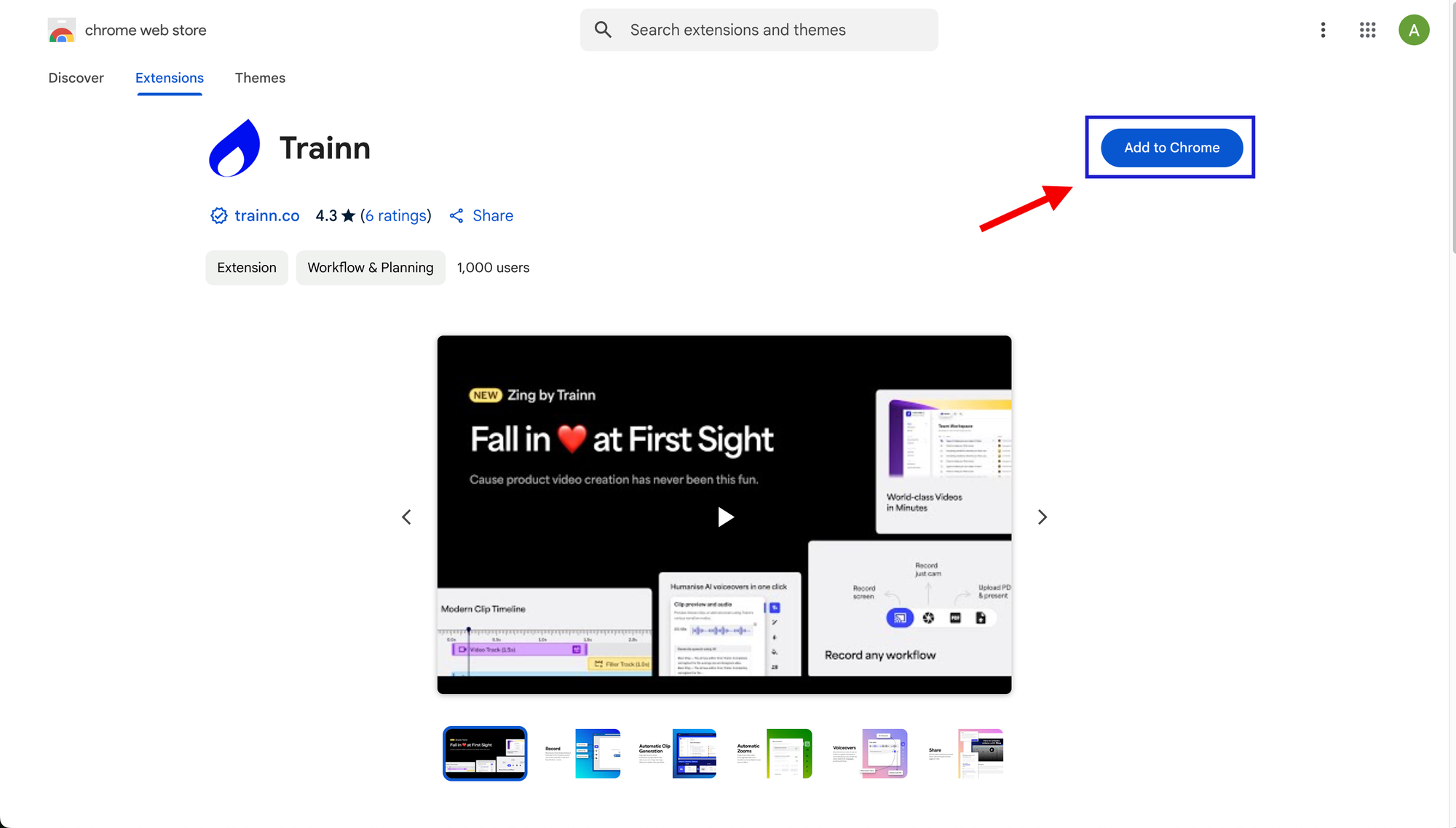
Step 1: Install the Trainn Chrome extension.
Go through this [link] and download the Trainn Chrome extension. The chrome extension is a must-have to record guides in Trainn.
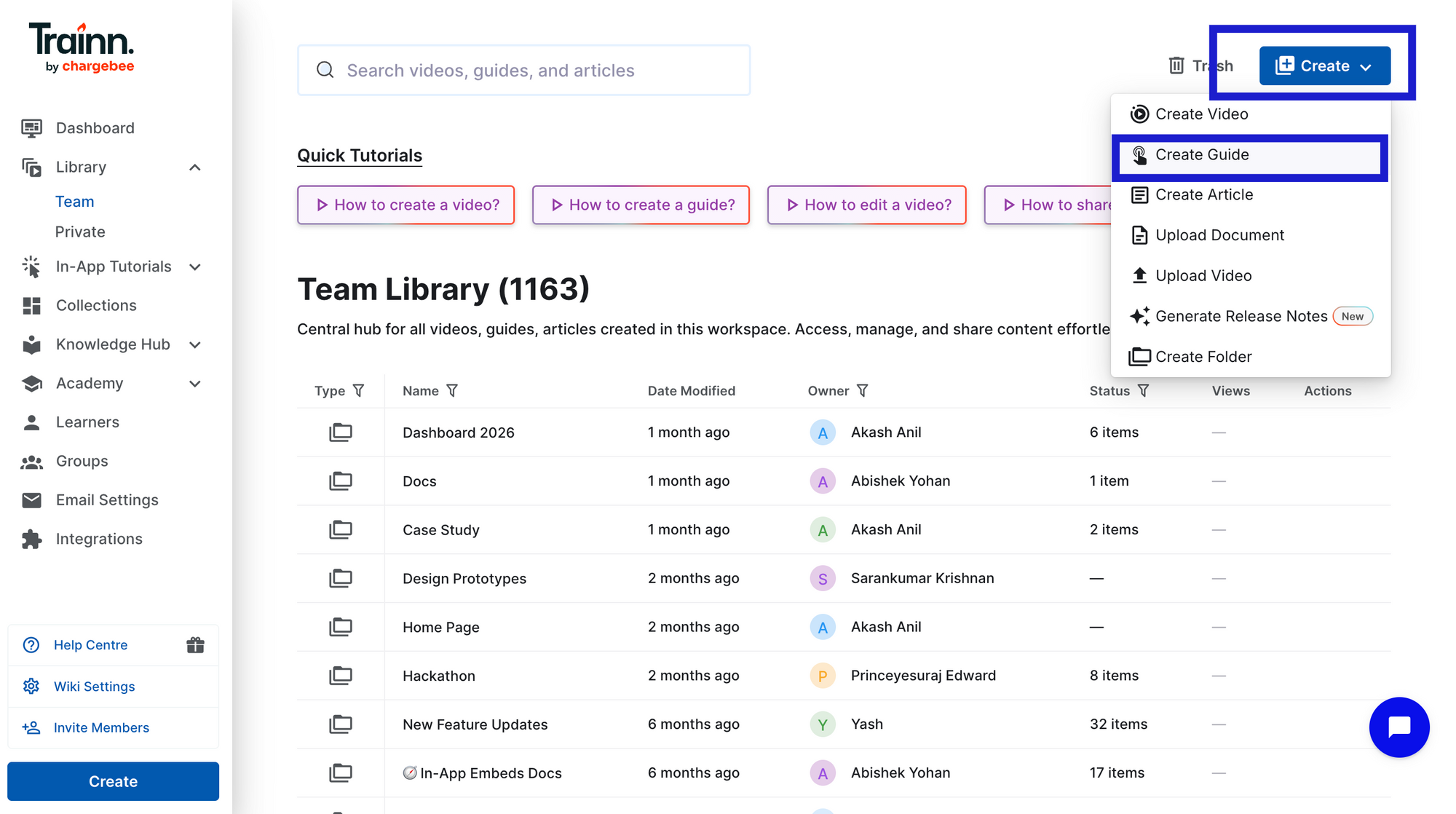
Step 2: Open Trainn and your product workflow
Go to the Library page. Click 'Create' and select 'Create Guide'.
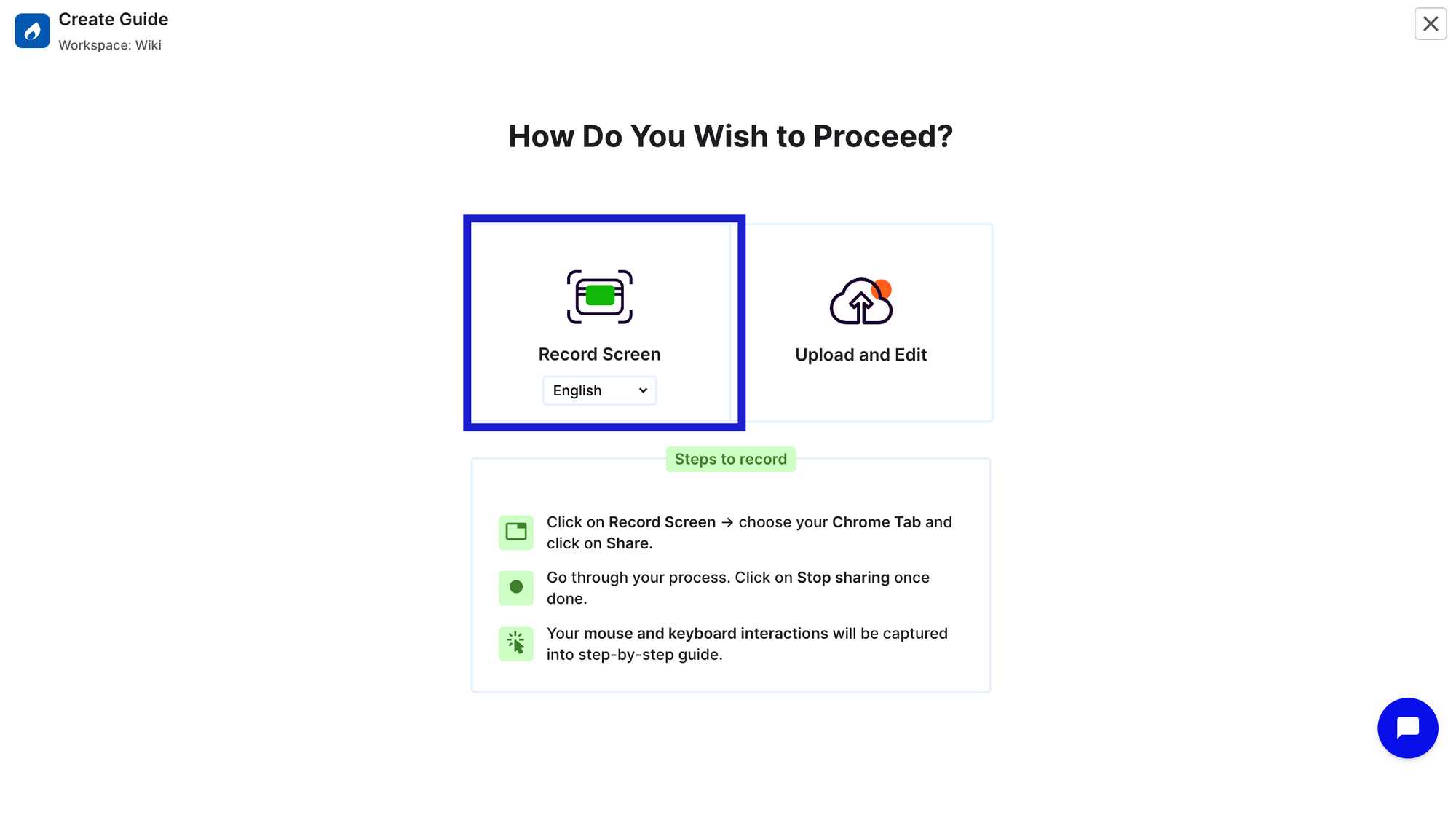
Step 3: Click Record and perform the workflow naturally
Click 'Record. Select the tab which you wanted to record and proceed with 'Share' to started recording. Just perform the workflow the way you would normally show it to a customer.
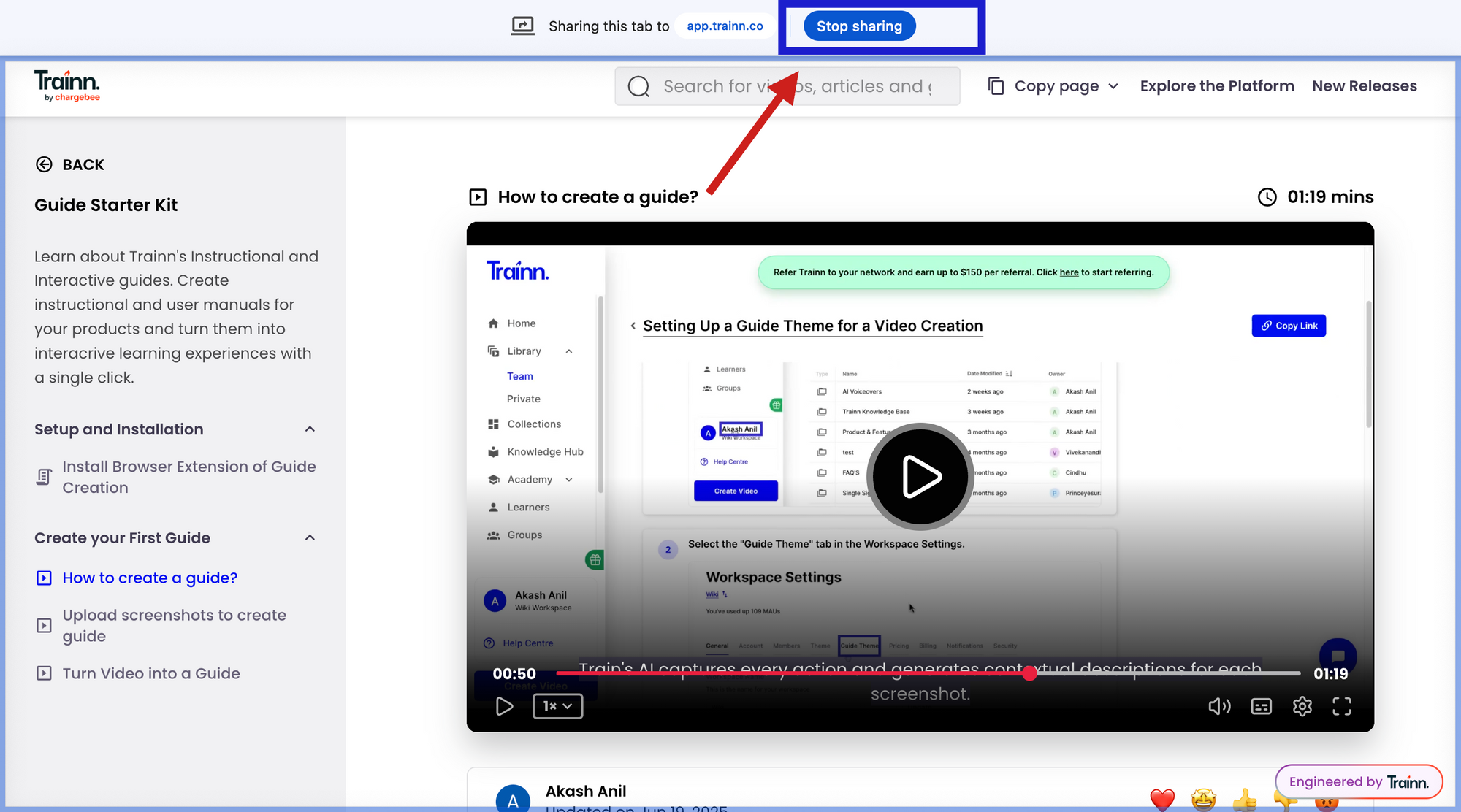
Step 4: Stop recording and step-by-step guide is generated
Once workflow is completed, click 'Stop sharing' from the same tab. Trainn automatically captures every action, and generates screenshots with zooms and spotlights to highlight actions and contextual step description.
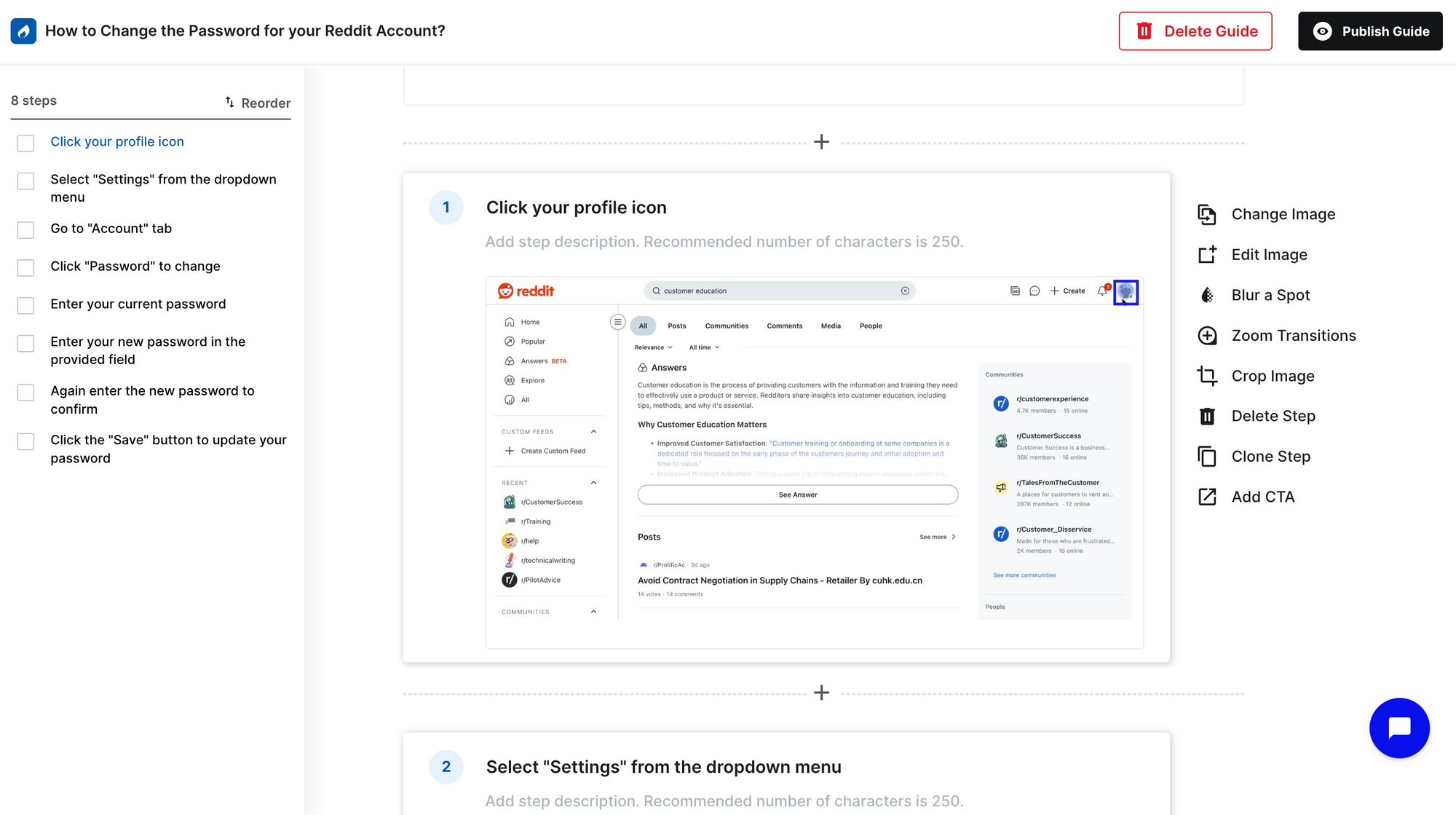
Step 5: Review and edit as per your requirements
Review each step. Editing happens at the individual step level. Swap any screenshot that needs updating, adjust zooms or spotlights, edit description, blur any sensitive data, and reorder steps if needed.
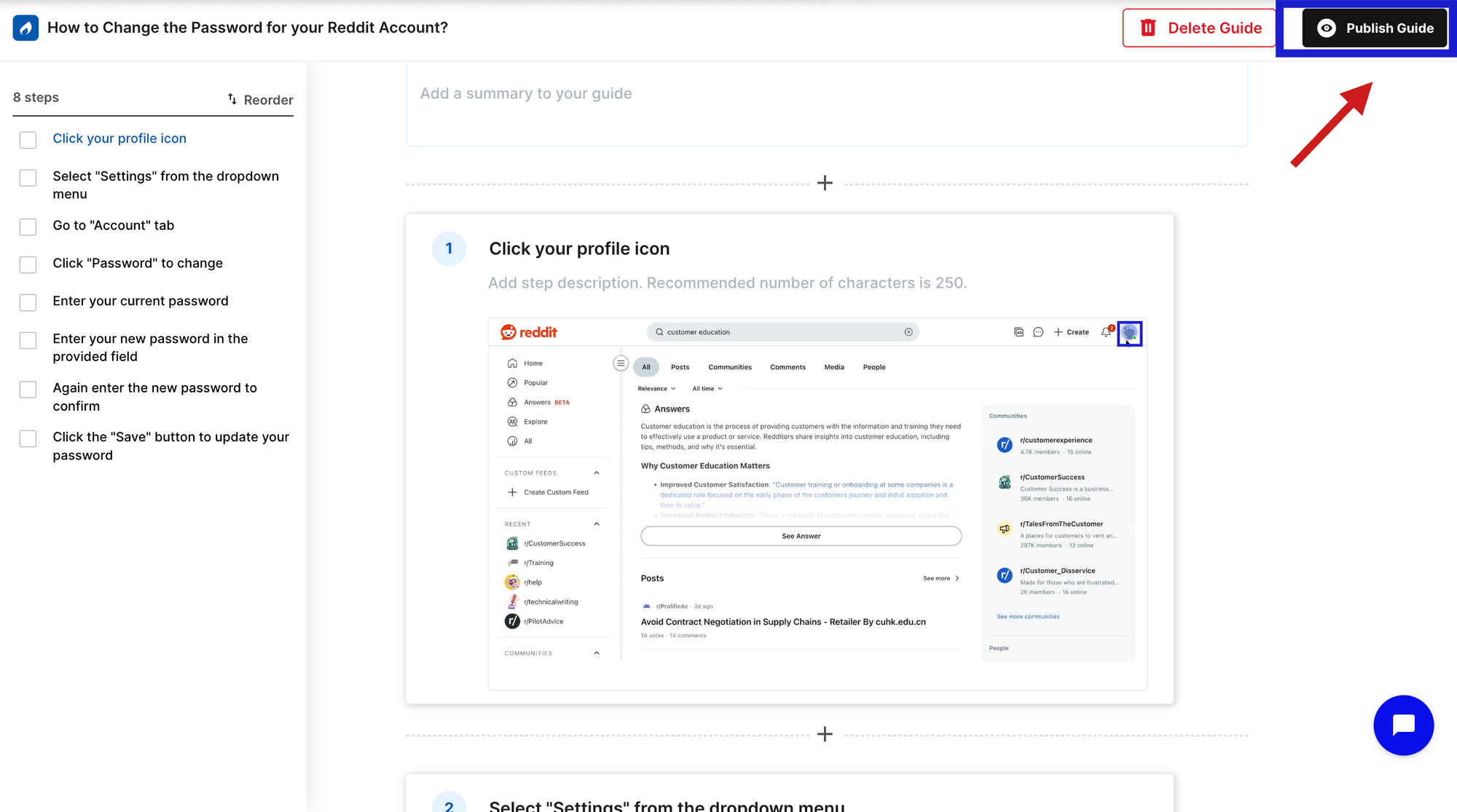
Step 6: Publish and share
Once reviewed, your step-by-step guide is ready to publish. Click ‘Publish’.
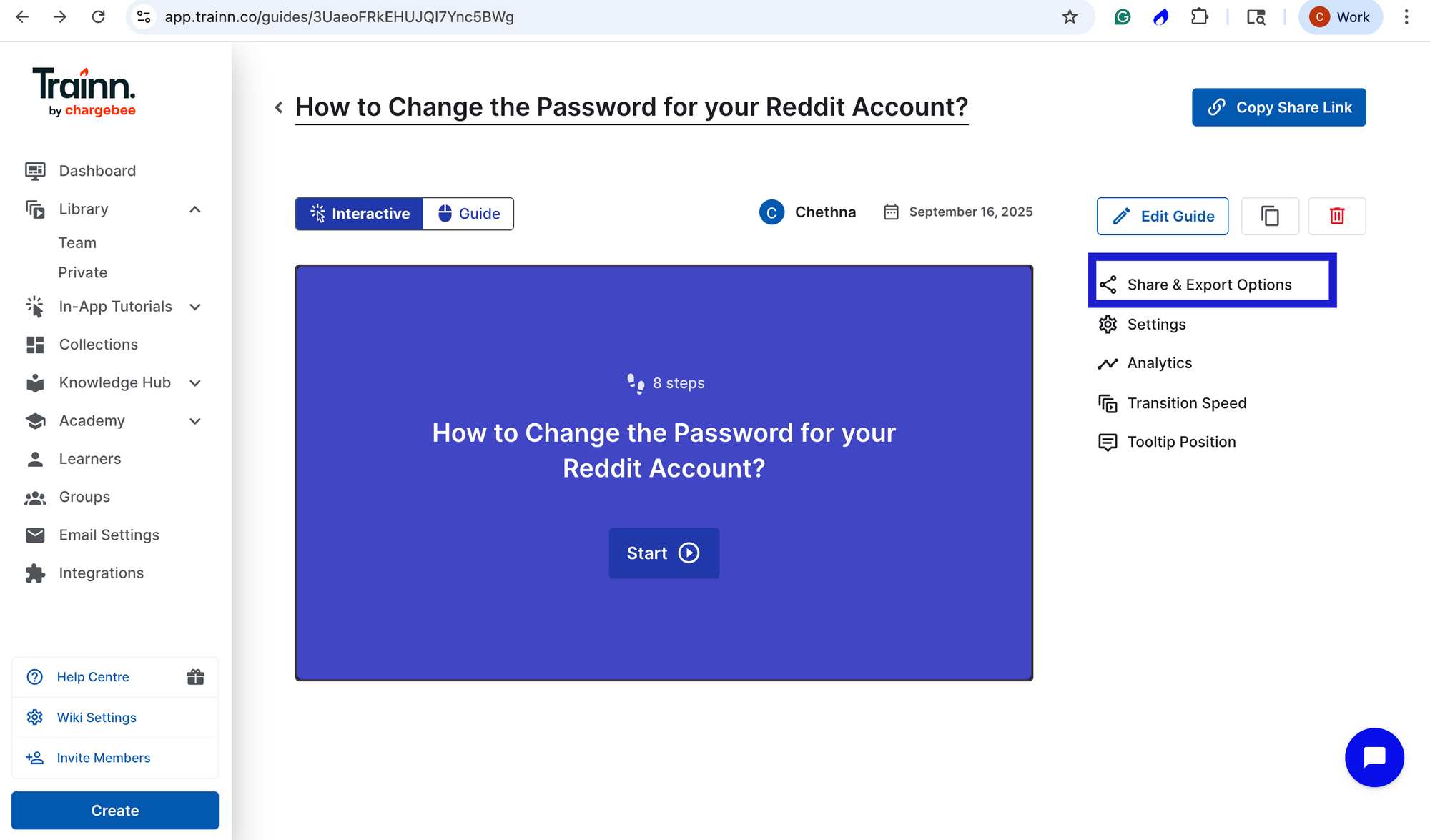
Step 7: Share, embed, export or publish directly in knowledge base or in-app tutorials
Now, you can share via link, export, or embed in your website. Or you can directly deliver through in-built Knowledge base or as In-app tutorials.
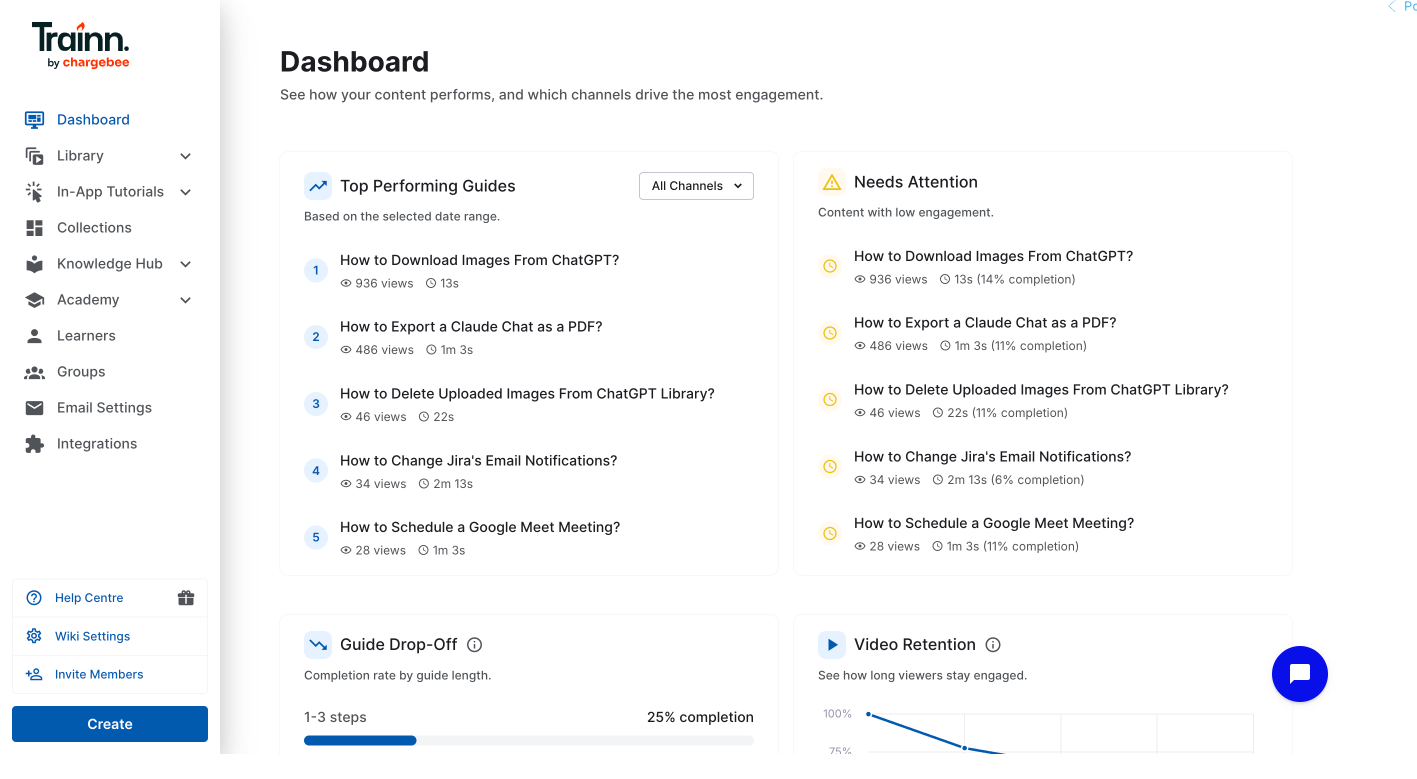
Step 8: Track and Iterate
Track individual step-by-step guide performance. You can analyze its views and engagement rate over a specified period.
Write the Guides This Week. Measure Next Week.
Start with your top ten ticket topics. Record the workflows with Trainn. Ship the first ten step-by-step guides this week — then measure which ones are deflecting tickets and which steps need fixing.
Start your free 14-day Trainn trial →
Frequently Asked Questions
What makes a step-by-step guide reduce support tickets?
A step-by-step guide reduces support tickets when it covers a topic customers are actively confused about, describes each action clearly enough to act on without pausing, uses annotated screenshots that match the current product UI, and is delivered where the customer is stuck — inside the product or in a searchable help center. Missing any one of these four conditions reduces ticket deflection.
How do I choose which step-by-step guides to write first?
Pull your ten most-filed support ticket topics from the past 90 days. These are your first ten guides. A guide written from ticket data answers a question customers are already asking. A guide written from your product's feature list documents what your product team built — not what confused customers are searching for. These are rarely the same list.
How many steps should a step-by-step guide have?
Each guide should cover one task in three to eight steps. More than ten steps usually means the guide covers more than one task. Break it at the natural completion point — the moment a customer would pause and feel a sense of progress — and link directly to the next guide. Shorter, focused guides have significantly higher completion rates than long, multi-task walkthroughs.
What should each step in a step-by-step guide include?
Each step needs four elements: a task-oriented title naming the action, a description explaining exactly what to click or type, an annotated screenshot showing the relevant UI element, and an outcome confirmation describing what the customer should see after completing the step. Missing any one of these causes customers to pause and lose confidence — and a pause at step three usually produces a support ticket.
How do I write step-by-step guides without spending hours on every one?
Use a screen-recording-based guide creator. With Trainn's step-by-step guides feature, you record the product workflow and the platform auto-detects each step, writes AI-generated titles and descriptions, and adds annotated screenshots — no manual writing needed. A guide that takes 45–60 minutes to write by hand takes under 10 minutes with Trainn.
How do I know if my step-by-step guides are actually reducing tickets?
Track guide completion rate and per-step drop-off alongside support ticket volume on that topic. High completion rate with falling ticket volume confirms the guide is working. High views with low completion — or persistent tickets after guide access — identifies the specific step that needs to be fixed. Measuring at the guide and step level is what makes deflection improvement actionable.
Ready to Trainn your customers?
- Create videos & guides
- Setup Knowledge Base
- Launch an Academy

Trainn is an AI-powered product video and guide creation platform that turns screen recordings into product demo videos, training videos, onboarding videos, step-by-step guides, and interactive walkthroughs. Trainn also delivers this content externally through a branded no-code LMS, or in-app through embedded tutorials to train customers at scale.

North Bethesda, Maryland 20852


