
- Features
- Resources
- Pricing
- Try Trainn's AI Video Agent


Product
Usecases
Resources
Case Studies
Company
- Customers
- Pricing
- Try Trainn's AI Video Agent
- Expert voices
- Log in
- Book a demo
- Sign up →
Published on: 22 Jun , 2026
Training Videos That Actually Teach: 5 Examples from Real SaaS Teams
On this page
Most SaaS teams skip training videos for the same reasons: no video editor, no agency, and no clear way to keep videos updated when the product changes. The five teams in this article skipped none of it. CS managers, product teams, and onboarding leads at Restroworks, Klenty, SendX, Chargebee, and Trainn built training videos their customers can actually follow, without video editing experience, and fast enough to keep up with every product release.
Each video below is live and watchable. And each one shows what a good SaaS training video actually looks like.
Five Training Videos Built with Trainn
1. Restroworks (formerly Posist) X Trainn
What the video covers
Restaurant managers at Restroworks run CRM Reports to track customer-linked sales data across their outlets. This video walks them through it, from the first click to the delivered report.
How they built it with Trainn
The team recorded a screen walkthrough in Trainn. Trainn automatically split it into clips, one per action, generated AI voiceover for each clip, and applied contextual zooms and spotlights throughout. Because each clip has its own voiceover synced to the action on screen, the narration and the recording always move together. The viewer hears the instruction the moment they see it happen.
The "Include Aggregator Bills" toggle is a setting most users scroll past without noticing. The spotlight on it, with the narration explaining the default and when to change it, is what keeps a viewer from making a silent configuration mistake.
What makes it a good training video
Most reporting tutorials stop at "click Generate." This one keeps going. Once the report is generated, the video walks through every field in it: bill number, date, customer name, items ordered, sales amount, the team member who processed it. That's the standard worth aiming for. Not just the steps, but the outcome, so the viewer knows what they're looking at when the report lands in their inbox.
2. Klenty X Trainn
What the video covers
Sales reps at Klenty use playbooks to automate follow-ups when a prospect shows high intent. This video shows them how to set one up inside a cadence, from picking a trigger to reviewing performance.
How they built it with Trainn
Trainn auto-applies contextual zooms and spotlights as the video moves through the Cadences interface. AI voiceover runs per clip, synced to each step, so the viewer hears the instruction exactly when they see the action. The trigger configuration steps are where the spotlights matter most. A wrong pick at those two points changes how the entire playbook behaves, and having those fields visually highlighted at exactly the right moment is what keeps a first-time user from getting it wrong.
Since Trainn's clip-based editing stores each step as its own clip, the team can update any individual step when the UI changes without re-recording the whole video. That's what makes it realistic to maintain a library of advanced feature videos over time.
What makes it a good training video
Most videos just show you where to click. This one explains why. The viewer learns what each trigger type does, how the open threshold works, and what the system actually does with that information. A user who gets that doesn't need to come back for help the next time something looks a little different. That's the difference between a training video that builds confidence and one that just teaches button sequences.
3. SendX X Trainn
What the video covers
Email marketers using SendX want to know how their account is performing. This video covers two places to find that answer: the account dashboard and the AI Deliverability Advisor inside Settings.
How they built it with Trainn
The team used Trainn's AI voiceover, and it sounds natural throughout. Trainn auto-applies contextual zooms and spotlights as the walkthrough moves through each step. The AI Deliverability Advisor is inside Settings, where most users never look. The spotlight on it, mid-video is what makes it discoverable at the exact moment the viewer is already paying attention.
What makes it a good training video
The AI Deliverability Advisor lives inside Settings, and most users never find it unless someone shows them where. This video surfaces naturally, as part of a walkthrough the viewer was already going to watch. Someone who came to find their account dashboard leaves knowing about a premium analytics tool they didn't know existed. A good training video answers the question on the label and quietly surfaces something valuable on the way.
4. Chargebee X Trainn
What the video covers
Chargebee admins and billing teams often create subscriptions manually for B2B customers or edge cases outside self-serve checkout. This video walks them through the full workflow, including the fields where misconfiguration has real billing consequences.
How they built it with Trainn
Chargebee is also Trainn's parent company. learn.chargebee.com, their primary self-serve knowledge hub, is powered entirely by Trainn. In the video, Trainn zooms and spotlights the fields that could cause billing problems if set wrong: the billing cycles field, the auto-collection dropdown, and the price override toggle. AI voiceover is synced per clip so the narration walks through each section of the form as it appears on screen. The team also made a smart call in the editor: the video opens with a quick explanation of what a subscription is in Chargebee's data model before the first click. New users get their bearings before the form even loads.
What makes it a good training video
Billing mistakes are expensive to fix. A viewer who doesn't understand what they're building before they start will misconfigure something. The definition at the start of this video takes care of that. The viewer knows what a subscription is in Chargebee before they touch a single field. That small addition makes every step that follows easier to understand.
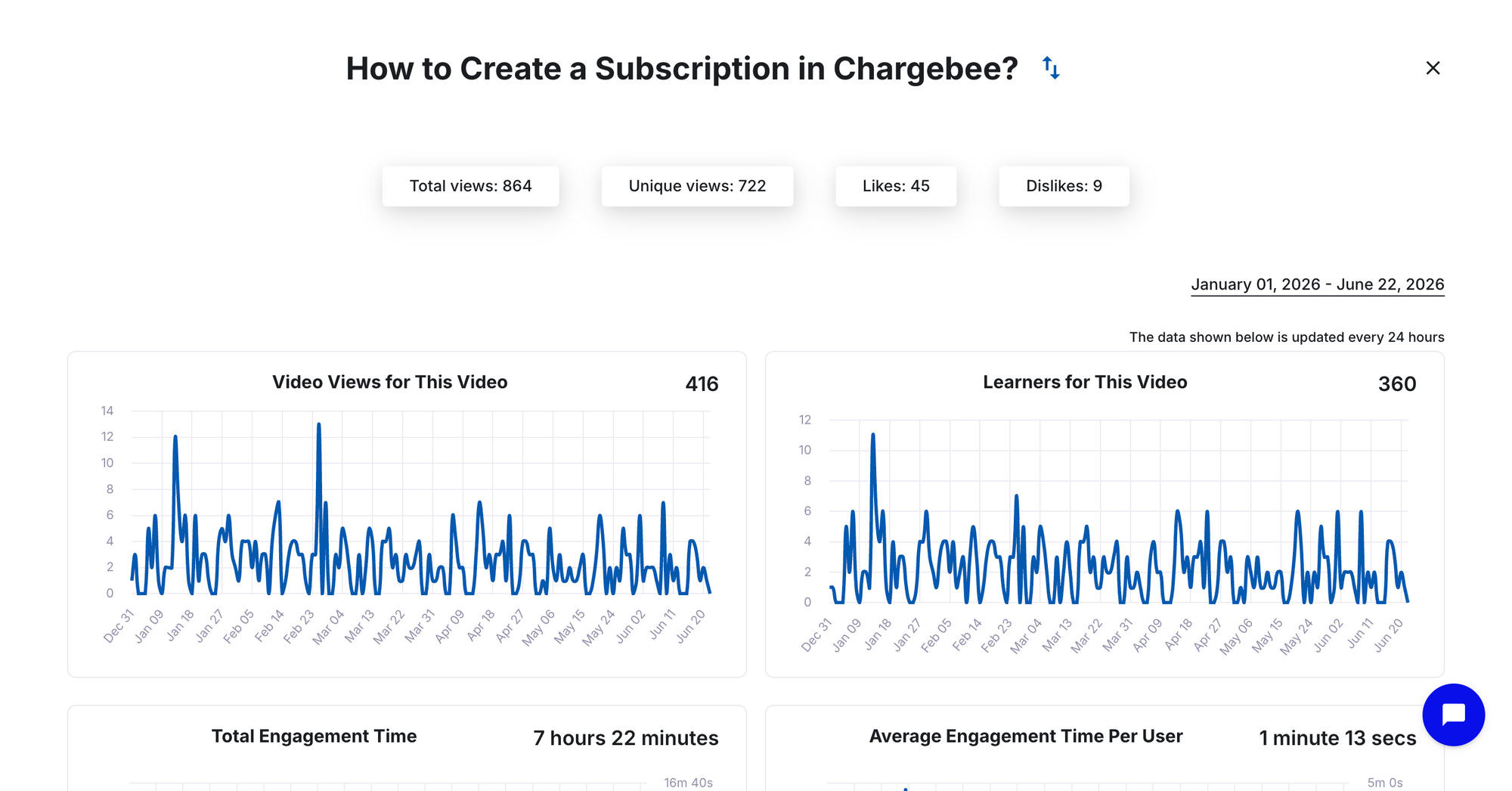
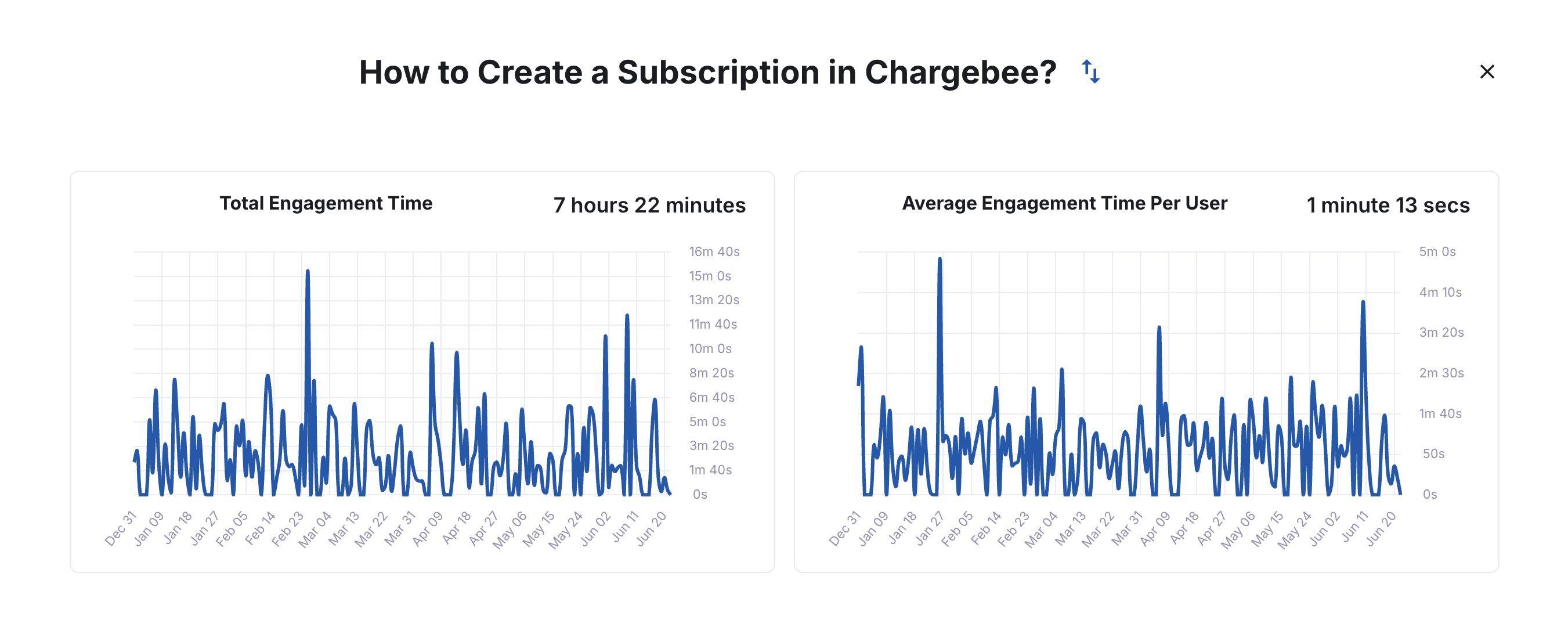
The engagement reflects it. This video had 416 unique viewers this half-yearly (January - June), with an average watch time of 1 minute 13 seconds on a 1 minute 58 second video. Viewers are watching through most of a billing workflow. That is strong, task-focused engagement for a how-to video.
5. Trainn
What the video covers
New Trainn users need to record their first video. This one walks them through it end to end: setting up the recording, editing the clips, and publishing and sharing the result.
How they built it with Trainn
Trainn used Trainn to build this one, following the same workflow any customer would use. The screen recording got auto-segmented into clips, AI voiceover was added per action, and contextual zooms and spotlights were applied throughout. The narration was edited using Trainn's text-based voiceover editor. Changing a line means editing text, not scrubbing a timeline. The video proves the product by existing: the training video on how to use Trainn was made using Trainn.
What makes it a good training video
The best way to teach someone a new tool is to show it in action. This video does that. The viewer watches the recording process, the editing process, and the publishing process happening inside the same tool they're about to open. By the time the video ends, they already know what their first session will look like. That's what makes it stick.
The engagement shows it: This video had 1,938 unique viewers, average watch time of 3 minutes 14 seconds on a 4 minute 7 second video. Viewers stay through the recording and editing sections, right where new users need the most guidance. That is high engagement for a 4-minute onboarding walkthrough.
What These Training Videos Get Right
Five companies, five products, five different audiences. Three things hold across all of them.
They go beyond the steps.
The Restroworks video doesn't stop at "click Generate." It shows what the report looks like when it arrives. The Klenty video doesn't just show where to click. It explains the logic behind the intent scoring. The Chargebee video defines what a subscription is before the form even loads. A video that only shows steps produces users who can follow along once. A video that explains the reasoning produces users who actually understand what they're doing.
They start from where the viewer is.
The SendX video starts with account health monitoring, which is what the viewer came to learn, not with a navigation trail. The Chargebee video starts with a definition, not a click. Both videos make the same call: give the viewer their bearings before the product appears on screen. Training videos that open cold with a navigation click lose viewers who aren't oriented yet. These ones earn attention before the walkthrough starts.
They're built to be updated, not just recorded.
Every video in this article uses Trainn's clip-based editing. Each step is its own clip. When the product UI changes, you swap out the one affected clip. The rest stays exactly as it was. That's the difference between a training library that gets maintained and one that quietly goes stale.
How Trainn Helps You Create Training Videos Like These
Every video in this article was made without a video editor, without an agency, and fast enough to keep up with product updates. Trainn builds the production layer directly into the tool.
| Trainn Feature | What It Does |
|---|---|
| AI voiceover | Converts on-screen actions or a written script into natural-sounding narration. No recording studio or external voiceover artist needed. |
| Zoom and spotlight | Focuses the viewer on the exact UI element being explained. Applied during editing, not during recording. |
| Background music | Adds a professional, produced feel to training videos and keeps viewers engaged through the full runtime. |
| Clip-based editing | Update one clip when a product UI changes without re-recording the entire training video. |
| One-click translation | Translate training videos into 25+ languages with a single click for global customer teams. |
Create Training Videos Like These with Trainn
Every team in this article built professional training videos their customers can follow, without a video editor, without an agency, and fast enough to publish the same day they recorded. Trainn handles the production layer so any CS manager or product person can do the same.
Start a free 14-day Trainn trial →
For more in this series: product demo video examples from real SaaS teams.
Frequently Asked Questions
What is the difference between a training video and a product demo video?
A training video is a post-sale, task-specific how-to walkthrough for existing users. It covers one workflow from start to finish, and the viewer leaves knowing how to complete a real task in the product. A product demo video is prospect-facing: it shows what the product can do, not how to do it. Every video in this article is a training video, built for customers who are already using the product and need to do something specific, independently.
What makes a SaaS training video actually good?
A good training video goes beyond showing steps. It explains the outcome the viewer is working toward, gives context before the UI appears, and surfaces the configuration decisions that actually matter. The videos in this article do all three: Restroworks explains what's in the report, Chargebee defines what a subscription is before the form loads, and Klenty teaches the scoring logic behind the trigger, not just which button to click.
How do SaaS teams create training videos without video editing experience?
All five videos in this article were made using Trainn, which handles the production layer automatically: zooms on every click, AI voiceover synced to each action, spotlight effects on key UI elements, and background music. The creator records a screen walkthrough and makes editing decisions in Trainn's editor. No video editing software, no recording studio, no external voiceover artist.
How long should a SaaS training video be?
As long as the workflow needs it to be, and no longer. The Restroworks CRM Report is just over a minute because the task is focused. The Chargebee subscription video is under two minutes for a 14-step form. The Trainn onboarding video runs just over four minutes because it covers recording, editing, and publishing end to end. When viewers consistently stay through most of a video, as the data from Chargebee and Trainn shows, the length is about right.
Trainn is an AI-powered product video and guide creation platform that turns screen recordings into product demo videos, training videos, onboarding videos, step-by-step guides, and interactive walkthroughs. Learn more at trainn.co.
Ready to Trainn your customers?
- Create videos & guides
- Setup Knowledge Base
- Launch an Academy

Trainn is an AI-powered product video and guide creation platform that turns screen recordings into product demo videos, training videos, onboarding videos, step-by-step guides, and interactive walkthroughs. Trainn also delivers this content externally through a branded no-code LMS, or in-app through embedded tutorials to train customers at scale.

North Bethesda, Maryland 20852


