
- Features
- Resources
- Pricing
- Try Trainn's AI Video Agent


Product
Usecases
Resources
Case Studies
Company
- Customers
- Pricing
- Try Trainn's AI Video Agent
- Expert voices
- Log in
- Book a demo
- Sign up →
Published on: 20 Jul , 2026
Customer Education Videos: Types, Examples & How to Make Them (2026)
On this page
Most teams already know video teaches better than a wall of text. What stops them is production. A single how-to used to mean a script, a voiceover, an editor, and a week of back-and-forth before anything went live, so the video library stayed a someday project while support tickets piled up.
Customer education videos are short, purpose-built videos that teach customers how to get value from a product: product demos, onboarding walkthroughs, feature how-tos, troubleshooting clips, and certification series. Delivered through a knowledge base, in-app, or an academy, they scale training to every customer without a live call, driving faster activation, higher adoption, and lower support load.
The reason to build them is not vanity. Formal customer education programs report a 38.3% lift in product adoption and roughly a 15.5% cut in support costs (Forrester, commissioned by Intellum), and video is the format most customers actually finish.
The production math has also changed. Video used to require a studio, an editor, and a week. In 2026, it requires a screen recording and minutes, because AI now writes the narration, generates the voiceover, adds the captions and zooms, and even turns the same recording into a written guide. This page covers which videos to make, how to make them fast, how to measure them, and when text beats video. For the underlying definition of the discipline, see our guide to what customer education is.
What are customer education videos?
Customer education videos are recorded lessons that show customers how to reach a specific outcome with your product, from first login to advanced use. Each one teaches a single job: activate an account, configure a feature, resolve a common error, or complete a certification. Unlike a marketing video that sells, a customer education video assumes the sale is done and focuses entirely on getting the customer to value.
They live wherever the customer already is. Embedded in a knowledge base article, surfaced in-app at the moment a feature is opened, or sequenced into an academy course, they replace the repetitive live walkthrough that does not scale past your first few hundred accounts.
Why Video Works for Customer Education
Video carries a demonstrated flow better than any other format. Showing a cursor move through a real workflow removes the ambiguity text leaves behind, so customers activate and adopt faster.
The numbers back it up. Programs that formalize this kind of teaching see a 38.3% increase in adoption of the products their training targets and about a 15.5% reduction in support cost (Forrester, commissioned by Intellum).
Video also matches how people prefer to learn a tool: watch once, do it alongside, move on. That is why it sits at the center of the modern education program. In the 2026 State of Education-Led Growth Report, 68% of teams say their program is now closely tied to product success, up from 32% in 2025 (Intellum).
The payoff is leverage. A two-minute clip answers a question before it becomes a ticket, and keeps answering it 24/7 for every future customer.
Types of Customer Education Videos
Six formats cover almost every job an education program needs. Each maps to a moment in the customer journey.
The mistake most libraries make is treating these as interchangeable. They are not. A demo and a troubleshooting clip serve different people at different moments and move different numbers, which is what the next section makes concrete.
Which Video for Which Journey Stage?
The single most useful thing you can do before recording anything is decide which video type serves which stage, and which metric each one is supposed to move. This turns a video library from a pile of clips into a system with a job at every step.
Read the table as a build order. Each type earns its place by moving the metric next to it:
- A product demo sets the expectation of value before the customer invests effort, which lifts activation.
- An onboarding walkthrough belongs in the first session, because compressing time-to-value is the strongest lever on early retention.
- Feature how-tos drive adoption once the basics are in place.
- Troubleshooting videos deflect tickets during ongoing use.
- Certification series push mastery and open expansion conversations.
- Customer stories fuel advocacy near the end of the journey.
Two of these types come up far more than the rest, so they are worth a closer look before we get to production.
Customer Onboarding Videos
Customer onboarding videos are the highest-leverage videos you can make. They act in the first 30 days, the window where most early churn happens, walking a brand-new user through the exact path to their first meaningful outcome so value arrives before doubt does.
A good one does a single job, not ten. It shows the flow to first value, stays under a few minutes, and sits at the point of need: in the welcome email, in the empty state of the app, and at the top of the getting-started course.
Measured against time-to-value, a tight onboarding walkthrough is the difference between a customer who activates in a day and one who never comes back. That is why it is the format teams build first when they build a customer education program.
Customer Training Videos
Customer training videos pick up where onboarding leaves off. Onboarding gets a user to first value; training videos build competence across the product through feature deep-dives, workflow how-tos, and certification series that take a customer from capable to expert.
These are the videos that compound. Grouped into a structured course or academy, they turn scattered how-tos into a clear path to mastery, which correlates with higher adoption and expansion.
Keep each one focused on a single skill and sequence them from basic to advanced. Completion of the series then becomes a useful signal that an account is deepening its use, not just holding steady.
How to Make Customer Education Videos
Producing a customer education video has always followed the same five steps. It is worth understanding the traditional pipeline, because it shows exactly where the time goes, and where AI now removes it.
The Traditional Pipeline
The classic workflow is script, record, edit, publish, distribute:
- Script. Write a tight narration for the one job the video teaches.
- Record. Screen-record the product, usually across several takes to get clean pacing.
- Edit. Trim dead air, add zooms and callouts, layer in captions and branding, sync the audio and screen actions.
- Publish. Host it and title it so customers can find it.
- Distribute. Place it in the knowledge base, embed it in-app at the point of need, add it to the academy, and link it from onboarding emails.
Only the recording step adds real creative value. The other four are execution, and together they are why a single video used to take the better part of a week. That cost is what kept most libraries thin.
The AI-assisted Pipeline: Video Without a Studio
The 2026 workflow collapses four of those five steps. You still record the product yourself, because that takes knowing which steps to show, but everything after the recording is handled automatically:
- AI turns a screen recording, or an imported Loom, into a structured video with narration written from the on-screen actions, plus a synthesized voiceover, captions, and zoom effects, with no timeline editing.
- AI voiceover and translation localize one recording into many languages, so a single session covers every market you serve.
- Clip-level, text-based editing lets you update the one step that changed instead of re-recording the whole video, which removes the biggest ongoing cost of a library: keeping it accurate.
- The same recording auto-generates a step-by-step written guide, so one asset becomes both a video and a doc.
The result: a CS manager or technical writer with no production background can ship a finished, captioned, branded video in minutes and maintain a full library without a dedicated video team. For the operating principles behind a program like this, see our customer education best practices guide.
Real Customer Education Video Examples
The programs worth copying are not video dumps. They are sequenced, consistently produced, and tied to a specific outcome.
Trainn customers show this applied at speed:
- BuildOps built a Learning Center of more than 100 how-to videos in about 45 days, shifting repetitive questions to a 24/7 self-serve library.
- WebEngage produced 75 training videos in four weeks, turning ad-hoc onboarding into certified courses.
- SpotDraft replaced one-hour onboarding calls with short, focused videos, and found customers now prefer a three-minute video to a live call.
In each case, the win came from tying fast production to one clear lever: deflection, certification, or call replacement.
For a widely cited industry benchmark outside the Trainn base, Webflow University is the reference standard. It offers free, on-demand video courses organized by job-to-be-done rather than by feature, and became a primary driver of Webflow's self-serve adoption. What makes it work is the structure, not the volume: clear learning paths, consistent production quality, and content that is easy to find the moment a user needs it.
How to Measure Customer Education Videos
A format sold on ROI deserves metrics attached to it. Track the number each video is meant to move, not the view count:
- Completion rate is the video's own health metric: the share of learners who finish what they started. Low completion flags a video that is too long or poorly paced. It matters because self-paced course completion averages only around 13% when content is not built to be finished (CloudShare), which is the strongest argument for short, single-job videos over long ones.
- Engagement / watch-through shows where viewers drop off, telling you exactly where to cut.
- Ticket deflection rate proves the value of troubleshooting and FAQ videos.
- Time-to-value tracks onboarding walkthroughs and is the strongest leading indicator of retention.
- Feature adoption rate, compared across trained and untrained cohorts, proves the value of feature how-tos.
For the full formulas and benchmarks behind each of these, see our customer education metrics guide.
When NOT to Use Video
Video is not always the right format, and saying so makes a program more trustworthy, not less. Skip or pair video in three cases:
- Reference material people scan (pricing tables, API parameters, keyboard shortcuts). Text is faster to search than a clip is to watch.
- Content that changes constantly. Unless you have clip-level editing, high-churn steps are cheaper to maintain as text.
- Accessibility- or bandwidth-constrained contexts. Never ship video alone; pair it with a transcript or written guide, which a good AI workflow generates anyway.
The rule of thumb is simple: use video to show a flow, use text to look something up, and let the best programs offer both from the same source.
How to Make Customer Education Videos in Trainn
This section is about how Trainn works. The rest of the page stands on its own.
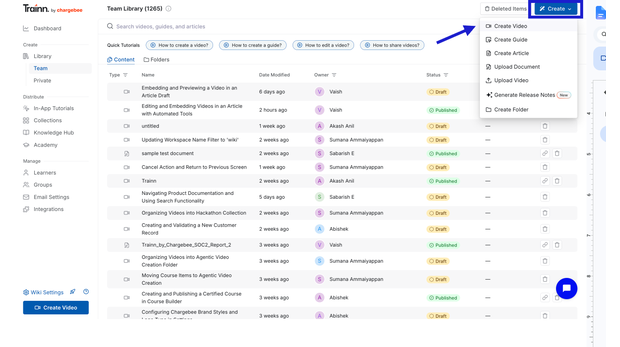
Trainn is an AI-powered customer education platform built for exactly the workflow above. Here is how you make a video, start to finish:
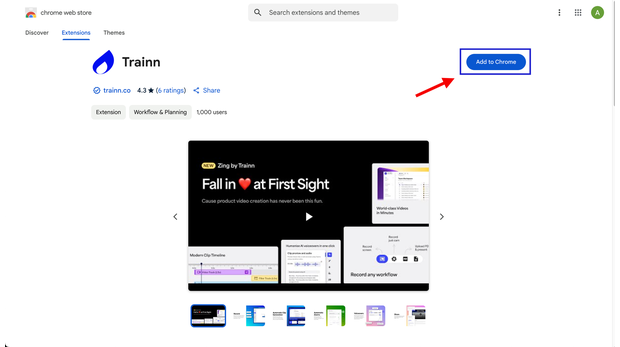
Step 1: Install the Trainn Chrome extension.
Add it from the Chrome Web Store. It is required to screen-record in Trainn.
Step 2: Open your product and Trainn
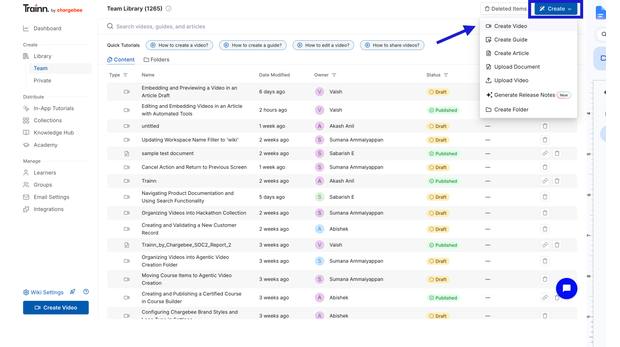
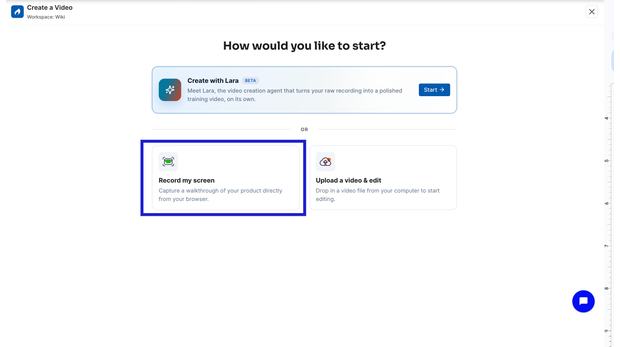
Step 3: Click Record and run the workflow.
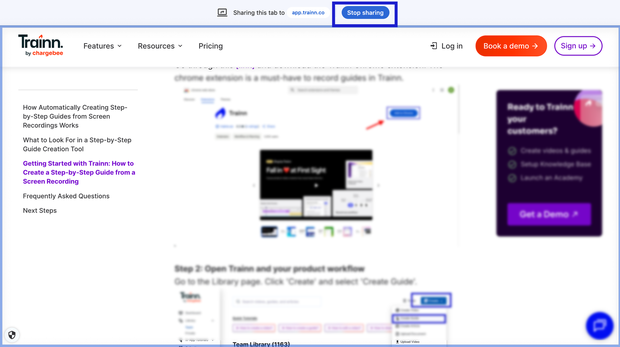
Click Record, select the tab you want to capture, and choose Share to start. Then perform the workflow exactly as you would show it to a customer.
Step 4: Stop recording, and Trainn builds the video.
It captures every action and auto-generates a video with zooms, spotlights, and an AI voiceover narration script.
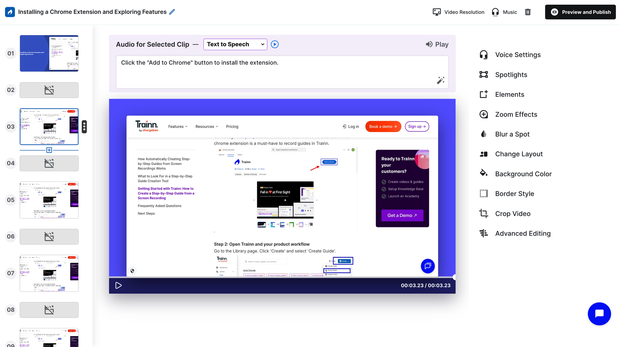
Step 5: Review and edit.
Trainn splits the recording into a clip per click, so you can trim, split, delete, or reorder clips with no editing experience, adjust the zooms and spotlights, and edit the narration as text.
Step 6: Publish the video
Once your changes are done, click Publish.
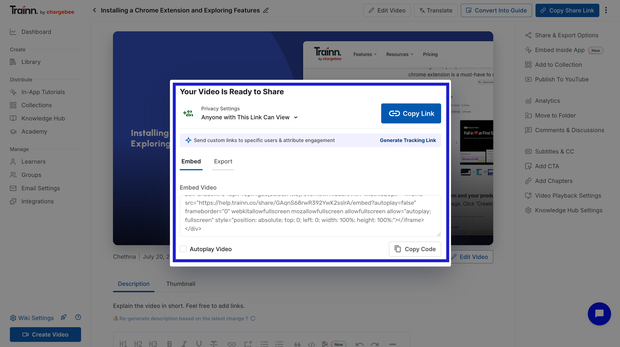
Step 7: Share and deliver.
Share a link, embed it on your site, export it, or publish it straight into Trainn's built-in knowledge base, in-app tutorials, or Academy.
Step 8: Track and iterate.
Monitor each guide's views and engagement over time, and refine what underperforms.
When the product changes, you update the one affected clip instead of re-recording the whole video. It is how teams like BuildOps, WebEngage, and SpotDraft shipped complete video libraries in weeks rather than quarters. See how Trainn works.
Frequently Asked Questions
- What are customer education videos?
Customer education videos are short, purpose-built videos that teach customers how to get value from a product. They include product demos, onboarding walkthroughs, feature how-tos, troubleshooting clips, and certification series, delivered through a knowledge base, in-app, or an academy so training scales to every customer without a live call.
- What types of customer education videos are there?
The six core types are the product demo or overview, the onboarding walkthrough, the feature deep-dive or how-to, the troubleshooting or FAQ video, the certification or course series, and the customer story. Each serves a different journey stage, from pre-onboarding activation through mastery and advocacy.
- How do you make customer education videos?
The pipeline is script, record, edit, publish, and distribute. With AI, four of those five steps are automated: a screen recording becomes a narrated, captioned, branded video automatically, so a one-person team can ship a finished video in minutes instead of the week traditional production required.
- How do you make them without a studio or budget?
Screen-record the product yourself, then let AI write the narration, generate the voiceover, add captions and zoom effects, and translate it. No camera, editor, or studio is needed. A CS manager or technical writer can produce and maintain a full library without a video production background.
- Which video works for which customer journey stage?
Use a product demo pre-onboarding to lift activation, an onboarding walkthrough to compress time-to-value, feature how-tos to drive adoption, troubleshooting videos to deflect tickets, and certification series to push mastery and expansion. Match each video type to the metric it is meant to move.
- How do you measure customer education videos?
Track completion rate and watch-through for each video's health, ticket deflection for troubleshooting videos, time-to-value for onboarding walkthroughs, and feature adoption rate for how-tos. Because self-paced completion averages only about 13% (CloudShare), short single-job videos consistently outperform long ones.
- What makes a good customer onboarding video?
A good onboarding video teaches one job, stays under a few minutes, shows the flow to first value, and sits at the point of need in the app, the welcome email, and the getting-started course. Measured against time-to-value, it decides whether new users activate or drift away early.
Building a video library used to be a production project. Trainn makes it a workflow: turn one screen recording into a video and a guide, deliver it as an in-app tutorial, publish it to a knowledge base, and build an academy, all from one place. It is how BuildOps shipped 100+ videos in about 45 days.
Ready to Trainn your customers?
- Create videos & guides
- Setup Knowledge Base
- Launch an Academy

Trainn is an AI-powered product video and guide creation platform that turns screen recordings into product demo videos, training videos, onboarding videos, step-by-step guides, and interactive walkthroughs. Trainn also delivers this content externally through a branded no-code LMS, or in-app through embedded tutorials to train customers at scale.

North Bethesda, Maryland 20852


